Title: Multiple bugs and crashes with D5 Render 3.1
Hello,
Since updating to D5 Render 3.1, I’ve encountered several major issues that ultimately forced me to revert to the previous version.
1. Arrow keys no longer work
The four arrow keys on my keyboard no longer function at all in D5 Render 3.1. They do not respond when I use them to navigate the scene.
2. Uncontrollable movement with the ZQSD keys
I also encountered a bug with the ZQSD movement controls.
When trying to move forward, the camera would randomly alternate between moving forward and backward while I was holding down the same key. The movement no longer matched the input, making navigation unreliable.
3. Graphical glitches and crashes with the AI Assistant
I also have an issue with the AI Assistant window used for applying effects or enhancing renders.
When I open the AI Assistant window, square artifacts appear and flicker throughout the interface.
The problem becomes even worse when I resize the window. The interface starts glitching heavily, significant lag appears, and D5 Render may eventually freeze or crash completely.
These issues only started after updating to version 3.1. They make the software very difficult to use for production work, so I decided to revert to the previous version, which is much more stable on my system.
System Configuration
Operating System: Windows 11 Professional
Windows Version: 10.0.26100 (Build 26100)
CPU: Intel Core i9-13900KF
24 cores / 32 logical processors
GPU: NVIDIA GeForce RTX 4090
Graphics Driver Version: 32.0.15.9186
Memory: 128 GB RAM
Motherboard: MSI MPG Z790 EDGE WIFI
BIOS: American Megatrends H.50 (April 18, 2023)
Architecture: 64-bit desktop (UEFI)
Display Resolution: 3840 × 2160 @ 59 Hz
Affected Version: D5 Render 3.1
Are these issues already known? Is a hotfix or update planned to address them?
I’ve translated your post for everyone to understand and see.
Most of the issues that you’ve reported are fixed in 3.1 Hotfix version, and currently it is still in grayscale release. The official release will just be around the corner and if you’re prompted to update to it, please proceed and let me know if any of the issue persists.
Thank you for your reply and for translating my post.
I have currently gone back to the previous version because D5 Render 3.1 was too unstable on my computer. I will wait for the official release of the 3.1 Hotfix, install it when it becomes available, and test the reported issues again.
I will let you know if any of the problems persist after the update.
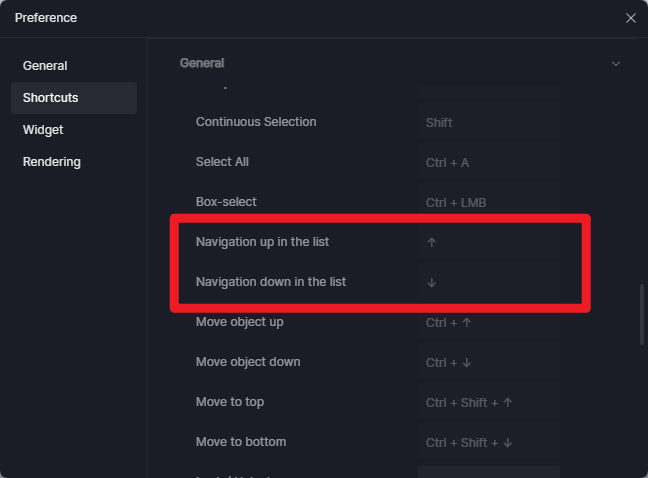
Will the hotfix allow the arrow keys for navigation again? On previous versions I was able to at least remap the keys but the up and down arrow is now locked to a menu / list navigation.
I am unsure of the version. But I was definitely able to either remap them, or one of the presets had them. I remember distinctively because I was happy to revert back to how I navigate in enscape and the only issue I had at the time was getting the middle mouse button to act as pan. Now in this latest version I have the pan working but the arrow keys can only map left and right.
I absolutely would prefer the arrow keys for navigation. I am not a gamer and never used WASD. I know the arrow keys have been requested in the forums in the past.
Interestingly I have found that the arrow keys work in walk mode (as well as WASD) but arrow keys do not work in fly mode.
I have also noticed that in perspective mode the middle mouse button acts as the Q and E keys and changes height where as 2 point perspective mode only lets you pan around from a stationary point/height. I don’t know why its all so mixed up and complicated.
D5 treats camera navigation and projection mode as separate systems, so switching between Perspective, Two-Point Perspective, Walk, and Fly can change how the same mouse and keyboard inputs behave.
If your goal is an Enscape-like workflow, using Walk Mode for normal architectural navigation may provide a more familiar experience
As for your observations regarding the navigation behavior, particularly the differences between Walk Mode and Fly Mode, as well as the arrow key functionality, we will forward your feedback to our team for further review.
We understand that the current navigation system can feel inconsistent, especially for users transitioning from other visualization software, and your feedback will help our team evaluate potential improvements to the overall navigation experience.