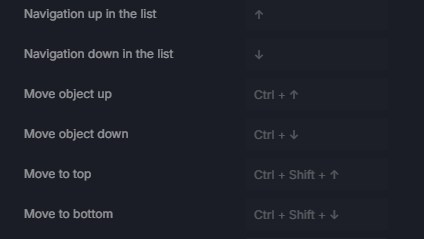
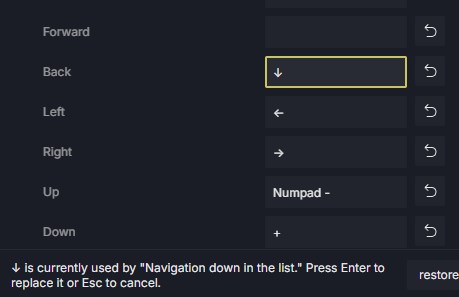
In previous version of D5, I was able to use my keyboards arrowkeys as navigations tools. For some reason, in latest releases, It’s not working anymore. The arrow keys up and down are locked by a function I’m never using (“navigation up in the list”), greyed out, and impossible to change (see attached pictures). Is there a way to allow the user to reset this ?
Hi @jeanthiriet
Which specific version has allowed you to remap these keys? 3.0 and 3.1 does not allow it.
D5 treats camera navigation and projection mode as separate systems, so switching between Perspective, Two-Point Perspective, Walk, and Fly can change how the same mouse and keyboard inputs behave.
- If your goal is to use these arrow keys, using Walk Mode for normal architectural navigation may provide a more familiar experience
Hi @Clov . Thanks for you feedback. I’m not sure which version allowed the navigation with the arrowkeys, but it seems to me that all previous version allowed the user to navigate using them.
Walk mode is a relly limited mode, just fun for a little tour.
I just want to navigate my model in fly mode while I’m working. Why is it impossible to just navigate with the arrow tools in this mode ? It’s a really common function, present in most other similar softwares, and would not require any complex changes in the software, so I hope users will soon be able to choose that option.
ok, but it come in conflict with other shortcut I have there. So, it’s a real inconvenience, and there is nothing to do about it then… I hope it will change soon.