@ela I sent email that has the collect log to the tech team now, you can check on it please
Thank you @solimanoculus. I have received the files. We will review and use them for further investigation. 
l have the same problem, can you please review my log files too
Hi @cigdemesim
Could you please help us confirm a few details first? This will help us narrow down the cause of the crash:
- What version of D5 are you currently using?
- Does the crash happen when using Save, Save As, or both?
- Does it occur with all projects or only a specific file?
- Have you recently updated D5 Render or your system (Windows, GPU driver, etc.)?
- Did this issue occur in the previous version?
Hi, I have the same problem too.
I’m using the latest 3.0 version, and the crash occurs when I’m trying to save or save as. This does not occur on the previous version
Hi all,
We have identified this issue in this topic.
Please first confirm: you cannot import models, save/save as the current file normally, and D5 will crash.
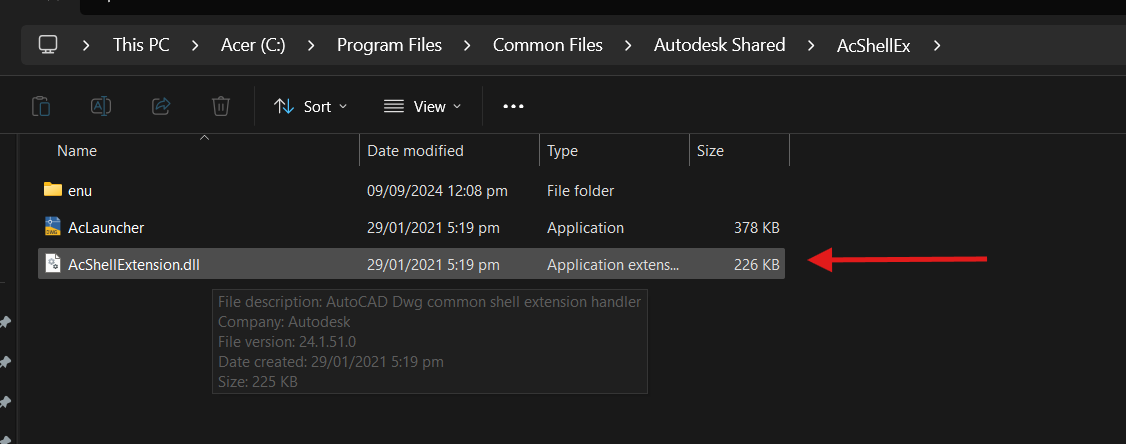
If so, the problem is caused by the Qt pop-up window conflicting with other DLLs.
You can try:
- Exit Claro drive or other cloud storage
- Locate and Rename the Autodesk DLL/plugin
Could not reach server (timeout). [127.0.0.1:12121], live sync abort - #16 by ela - If your device has none of the software above, please collect a log file and send to us. Thanks.
zziplog.zip (3.
I’ve tried to rename the file, and I don’t have any cloud storage running, but the problem is still persistent. Every time I tried to save (Windows Explorer Open), the app crashed.
1 Like
I have the same issue. Please help.
Hi @empire were you able to try the suggestions from Leah? D5 Crashes when "Save As" or "Save" is used - #24 by Leah_Li
I’m having a very similar issue— at first I noticed it was whenever I was trying to render, regardless of project (new/old/etc), like above. However the more I dug, D5 seemed to be crashing whenever an action opened file explorer. Things like “render”, “save as” (save works), “location” within the ender queue menu, etc… even just clicking “file”->“open” crashes D5 once file explorer opens. The only discrepancy between above and myself, is theirs was making it to 25% in some cases, I can’t manage to get that far. It seems likely related to the latest update as I rendered this project the day before with no issues. I also cannot see the “Integrity Check” within the help settings that was suggested… Let me know if any other info could be helpful, thank you!
1 Like
Hi @basekev25
Thanks for your detailed description. It sounds like you’re facing a similar problem. Please check these troubleshooting.
D5 Render Version: 3.0.1
Graphics Card: RTX 4070
Issue Description: Opening the save or import dialog would crash D5, no rendering could be done (windows file explorer native dialog)
Crash Details
- Exception Code: 0xc0000005 (ACCESS_VIOLATION)
- Faulting Module: MSVCP140.dll
- Faulting Module Path: D5 Render\framework\MSVCP140.dll
- Faulting Module Version: 14.00.23918.0 (built 2015)
- Fault Offset: 0x0000000000018d94
- Fault Bucket: 1993873178323938580
- D5 Version: 3.0.0.345
Solution
Replace D5’s bundled MSVCP140.dll with the system version. (MAKE SURE TO COPY THE DLL AND MAKE A BACKUP OF THE D5 DLL FILE)
System DLL Version
-
Version: 14.44.35211.0 (2022)
-
Location:
C:\Windows\System32\MSVCP140.dll
Only posting this as its been an Issue the last few days, we figured it out inhouse so want to share it incase someone has this issue also.
Please be careful messing with any files and make sure you know what you are doing before copying the system files
Hope this helps someone 
3 Likes
I am using D5 Render 3.0.
The crash happens with both Save and Save As.
If I click Save very quickly (within a few seconds), it saves successfully.
However, if the file dialog stays open for more than a few seconds while I choose a folder or rename the file, D5 crashes.
This happens even with very small projects or single assets, so it doesn’t seem related to file size or scene complexity.
My GPU driver is NVIDIA Studio Driver 591.74.
Recently I installed Google Antigravity, Claude, ChatGPT, and Unreal Engine, but I uninstalled all of them. The problem still continues.
I also completely uninstalled and reinstalled D5, but the issue remains.
I can´t save the file, when the file directory opens, d5 crashes instantly, has been happening recently and i have tried solving it in multiple ways but none of them work
Hi @a19792
Sorry to hear about this. What version of D5 are you using?
Your situation may be related to a known issue affecting some users recently. Please try the workaround mentioned above and let me know if it resolves the problem.
Thank you for your patience, and I look forward to your update.

thank you very much , it worked for me
1 Like
Hello D5 Team,
I’m experiencing a critical issue where D5 crashes instantly whenever the Windows file save dialog opens, making it impossible to save renders or any files.
Symptoms
- As soon as the Windows file explorer / save dialog appears, D5 freezes briefly
- The dialog becomes unclickable
- D5 then closes automatically
- This happens before saving, regardless of render settings
- The issue occurs 100% of the time
- It affects all projects, including new empty scenes
At this point, I cannot save any files at all because the crash is triggered solely by opening the file dialog.
System Information
- OS: Windows 11 (latest updates installed)
- GPU: NVIDIA RTX 5080
- GPU Driver: Latest NVIDIA driver
- D5 Version: Latest version
- This is not project-specific
What I’ve Already Tried
- Restarting Windows (multiple times)
- Reinstalling / updating GPU drivers
- Switching GPU performance settings (Windows Graphics Settings → High Performance)
- Disabling Explorer previews and thumbnails
- Forcing legacy file dialogs via Windows registry
- Disabling overlays (NVIDIA Overlay, Xbox Game Bar, etc.)
- The crash still happens the moment the file save dialog opens
Conclusion
This appears to be a system-level conflict between D5, Windows 11’s file save dialog, and NVIDIA RTX 50-series drivers, rather than a project or user configuration issue.
At the moment, this issue completely blocks any workflow, since saving files is not possible.
I would appreciate guidance, confirmation of a known issue, or any workaround from the team.
Thank you for your support.