D5 3.0.1 stuck on initializing

sence the new update mine ha been stuck on initilalizing for over 30 min and no matter what i do
even reinstalling it
noting works

my hardware

Graphic card NVIDIA GeForce GTX 1070
Driver Version 32.0.15.8228
Memory 17.4932 / 31.8936 GB
System Microsoft Windows 11 Home (26200)
CPU Intel(R) Core™ i7-8700 CPU @ 3.20GHz
GPU Share Memory 3.40/ 16 GB
VRAM 3.94 / 8 GB
TDR 60

After upgrade from 3.0 to 3.0.1 I can’t open one of my projects (loads 99% and crash).

hi,
possibly the out of vram cause this issue.
what is ur gpu and vram .

I don’t think that’s a problem. I have RTX 4070 12GB
config

hi, can u share project . i’ll try my end, to recover .

hi,
i have tried every attempt, like merge and removing merged d5a in assets . but no luck.
still crash at 99 percent. i think project is corrupted, if u have time in hand better create new one.
D5 team only hope now.
thanks

Hi @nalltarien2

Sorry for the inconvenience caused. We’ve identified the issue and it’s related to the latest NVIDIA driver (version 582.28) for GTX 10-series graphics cards. This driver is currently incompatible with D5 Render (versions 3.0 and 2.11).

To resolve this, please roll back your NVIDIA driver to version 581.80, then restart your computer and launch D5 again. This should resolve the issue. Please let me know once you’ve tried this, or if the issue persists. Thank you.

Hi @driven8

I apologize for any inconvenience caused. Could you please confirm the following:

  • Does the issue occur only with this project, or also with other/new projects?
  • Was this project originally created in D5 3.0 or an earlier version?
  • Are you using imported/custom assets or mostly assets from the D5 library?
  • Did you enable FPS Booster or add any heavy assets before the issue started?
  • Does D5 show any error message, or does it close immediately?

Thanks and I look forward to your update.

  1. So far, this project
  2. was originally created in version 3.0
  3. I think only two pieces of SketchUp furniture were imported
  4. There were no problems until then. I have FPS Booster enabled by default in every project.
  5. After loading 99%, it suddenly shuts down

I can also send you a packaged project that cannot be opened in 3.0.1.
Is it possible to downgrade from 3.0.1 to 3.0? Or how to install 3.0 after uninstalling 3.0.1?
Thanks.

Hi @driven8

Yes, please send the project file directly to support@d5tech.com. When you do, tag me in the email and include the link to this forum post as a reference.

Once received, we’ll check why the project fails to open in D5 3.0.1 and advise on possible solutions, including any downgrade options. Thank you for your patience.
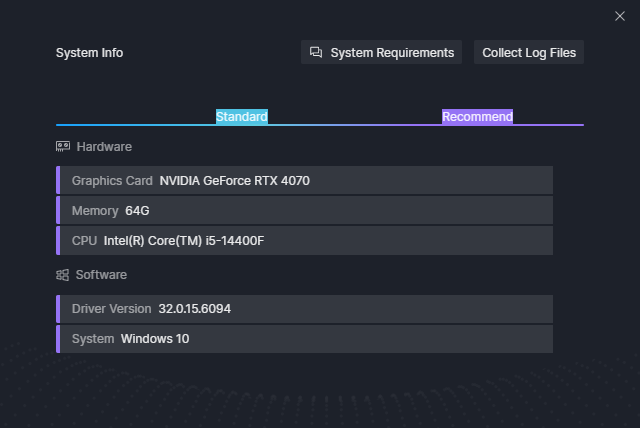
I also have the same problem ,help.

Hi @s6731247

Apologies for the inconvenience caused. Could you please confirm the following?