D5 Render Version:
Graphics Card: rtx 4090
Driver Version:
Issue Description:
Screenshots/Videos Description:
Steps to Reproduce (optional):
Sorry for the inconvenience. This error is usually caused by port conflicts. Please restart the device and connect with D5 again. Let me know if it works. Thanks
I tried many times… Problem is when I want to save my project. Save, or Save as make crush every time… Also I reinstal D5 yesterday, and here is the same problem…
Sorry for the inconvenience caused. Crashes when saving can occur if the project is corrupted, saved to a network/cloud location, or if a firewall/antivirus blocks local ports.
To help troubleshoot, could you confirm:
- Does this happen with all projects or just one in specific?
- Where are you saving the project — local drive or cloud/network?
- Have you tried saving with a new name or in a different folder?
- Does the timeout occur before or after the Save dialog?
- Are any Live Sync or external workflows active? What are they and which versions are you using?
Meanwhile, you can try restarting your computer and temporarily disabling firewall/antivirus. I look forward to your response. Thanks in advance.
- With all procjects.
- Local Drive
- I can’t save. When I click Save or Save As-it crush imidiatly
Just to confirm, are you still encountering the same error, or has that been resolved and you’re now primarily experiencing save issues? Or are both issues still occurring?
Regarding the error, it may be related to security software. Could you please let me know which antivirus program you’re currently using? As a best practice, we also recommend configuring firewall exceptions for D5.
Additionally, for the crash issue, could you please take a screenshot of your D5 system information and share it with me? Please also let me know whether this started before or after a recent update.
Thank you for your cooperation. I look forward to your response.
In firewall sistem, D5 is allowed.
Version 3.0.0. or Version 1.0.1.0014.
Problem started with new update.
I’m already a bit nervous, because it’s been going on for 3 days. I tried deleting D5, and installing a new one and still the same problem. The program works without any problems, but when I want to do a batch render, I have to save it first and it always crashes. I also tried to save old projects again and it crashes as soon as I click save or save as.
Thank you for the clarification, and apologies for the inconvenience—crashes during saving are a hot issue lately.
Could you please confirm whether both “Save” and “Save As” trigger the crash?
To help us investigate, please collect your D5 log files, zip them, upload the zip file to WeTransfer, and send the download link to support@d5techs.com.
Thank you for your patience and cooperation.
1 Like
I sent you zipped log files.
Thank you for sending the files. I’ve received them successfully. We’ll review the logs and get back to you with our findings as soon as possible. Thank you for your patience.
Just an update, after reviewing the log files you sent, our team was unable to find any crash-related information. This usually means the logs were collected before the crash occurred or did not capture the exact moment of the issue.
Could you please help us by collecting a more recent log file using the steps below:
Please ensure the crash occurs before collecting logs so that the the crash information is properly recorded. Thank you for your patience and cooperation.
Thank you @jerkopetrovic1. We’ll review the logs again and get back to you with our findings as soon as possible. Thank you for your patience.
Our team has reviewed the latest log but didn’t find anything unusual. Please update D5 to the latest version and try again. If it still crashes after the update, please collect the new logs and send them to us for further checking. Thank you again for your understanding.
2 times I sent you log files. I don’t see the point anymore. I updatet new version today, restart PC and still crushing… I lost 7 days. :S
I’m really sorry for the trouble. The team has re‑reviewed your log files, and it appears the crash may be caused by an Autodesk DLL/plugin. You could try renaming the relevant Autodesk plugin to see if that resolves the issue.
Please rename this: AcShellExtension.dll > AcShellExtension.txt
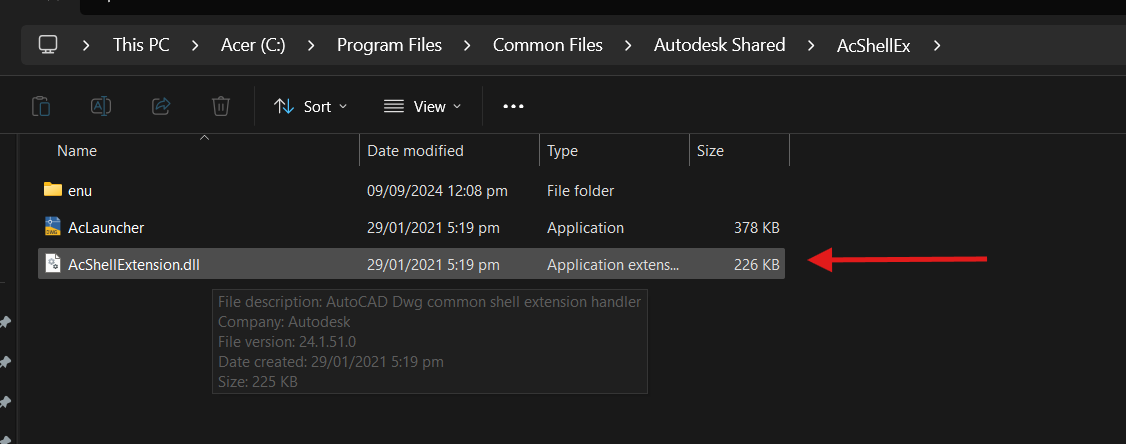
If it still doesn’t work, please completely delete this file. Let me know the results after trying this so we can continue assisting you.
IT WORKS!!! Thank youuuuuu!!!
1 Like
Thanks for the advice, this works. Well done!