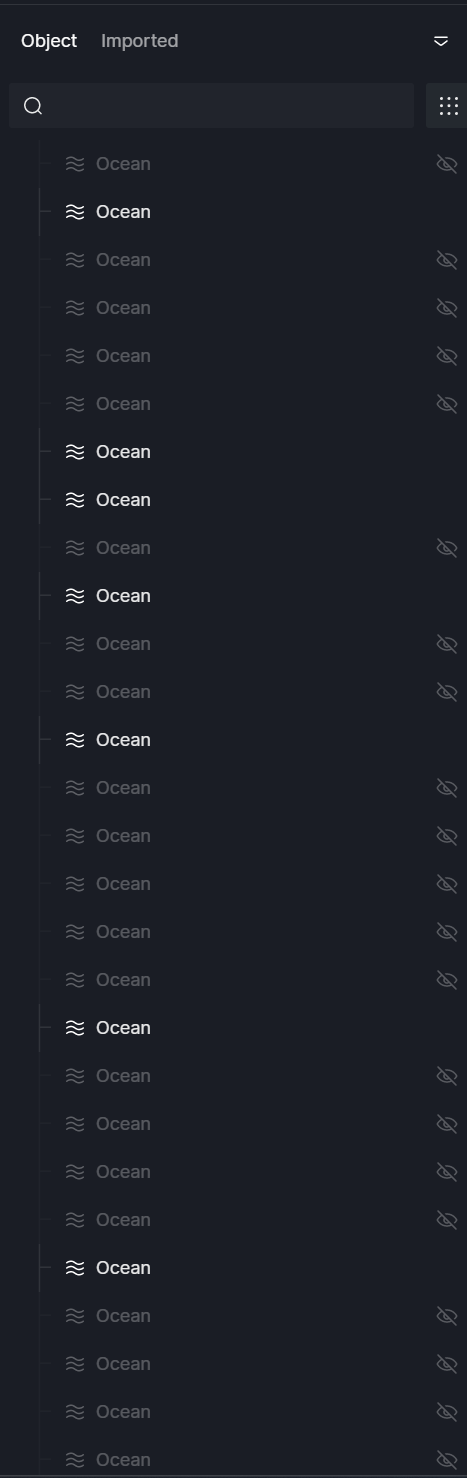
While using worksets, we’ve noticed that no matter which workset an ocean is created in, it duplicates itself upon every save in every workset. It seems like it cannot be bound to a specific layer or workset like other objects. This seems like a major bug because it very quickly multiplies after each person saves.
If I created the ocean in the default workset A, and then open another workset B, it will disappear from workset A and appear as if it part of workset B.
Thank you for reporting this. This does seem like a significant issue, especially in collaborative projects. To help us investigate further, could you clarify a few points:
Does this duplication happen every time you save and switch worksets, or only occasionally?
Do other environmental objects (like clouds, terrains, etc.) behave normally, or is this issue unique to oceans?
Does the duplication happen in a new, simple scene with just two worksets?
Which exact version/build of D5 Render are you using, and are you using Live Sync with any other software?
Could you also please provide a short screen recording of your workflow (creation, saving, workset switching, and duplication)?
Thank you in advance, and I look forward to your reply.
Thanks for the quick reply. It seems to happen every time it saves. I’m not sure if it applies to terrain since I’m not actually able to add a terrain for some reason either. The terrain button is missing (only shows Ocean, Cesium, and City). It’s hard to understand the behavior. Everytime I reopen to apply the updates from other worksets, the current workset open just keeps adding more oceans and some appear to be toggled on or off randomly.
I would greatly prefer if it was treated as any other asset so it can be bound to a workset. This is incredibly frustrating.
I’m using version 3.0.1
And we are using Live Sync with Rhino on each workset. But that hasn’t caused any problems for us thus far.
I unfortunately cannot provide a screen recording as the project is under NDA.
All members on my team are experiencing the issue. We all are primarily working in our own worksets and the oceans looks like it’s part of whichever workset is open. I think it’s because the ocean is unable to be bound to a particular workset.
And yes, it duplicates after every save from another workset. So if another workset saves, and I hit the update button, my workset reopens with an additional ocean.
For the terrain button, it looks like it only appears when opening the central file.
And yes, all team members are using the latest 3.0.1 D5 and Rhino Live Syncs.
Also we noticed that the ocean toggle does not save per view. We have some scenes where we would like the ocean turned off but the toggle in the layers panel seems to be global. This also seems like a bug since it’s inconsistent with how other terrain items like Cesium work.
Thank you for the detailed explanation — that’s very helpful.
Could you please confirm which Rhino version and Rhino LiveSync version your team is currently using?
Additionally, please collect and share your D5 log files with us at support@d5techs.com. Once uploaded, kindly tag me in the email and include the link to this forum post for reference.
Also we’ve noticed that the coastline feature does not work when the geometry is too far from the global origin. We think it’s a cool feature but more often than not we are unable to change the origin for all of our synced models, especially when working collaboratively. If there is a way to fix this bug or at least change the origin point for the ocean so that it can be closer to our model, that would greatly appreciated.
Apologies for the delay in getting back to you. We’ve already reviewed your case and were able to replicate the issue on our end. Our team has confirmed that it’s a bug and that it’s scheduled to be fixed in the next software update.
Thank you very much for your patience while we work on this.
Is there still no bug fix available for this? I reported the bug back in February and you were able to confirm. I hope you guys can start to release bug fixes on a more regular cadence than feature updates because waiting 3 months for a simple bug fix is unacceptable.
This issue is planned to be fixed in an upcoming version, but we don’t have a confirmed release timeline yet. We understand the frustration and appreciate your patience while we work on it.