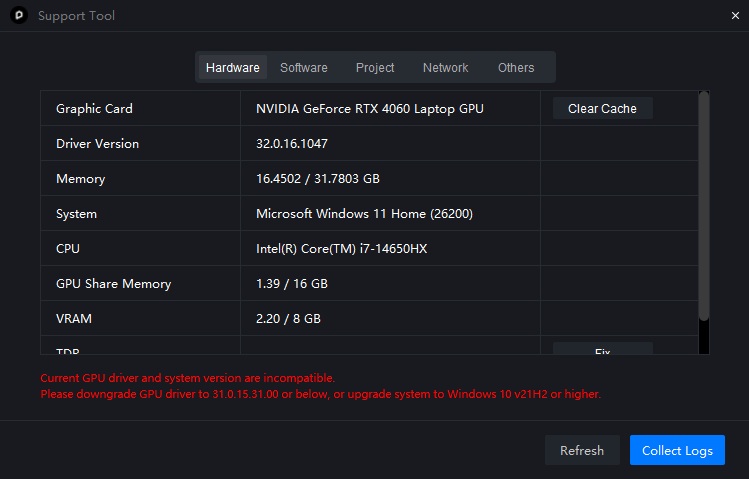
I apologize for the inconvenience. We have received similar reports from other users regarding issues with NVIDIA Driver 610.47. Many users have been experiencing frequent crashes with D5 when using this driver version.
Have you used D5 Render before updating your drivers?
Are you currently experiencing crashes?
Thank you for sending your logs; we will investigate them.
Thanks for the update and for confirming it’s a known issue with the support tool.
To answer your questions regarding performance and stability:
I am unfortunately not able to use D5 entirely without issues. The viewport has been quite laggy during normal use.
I am experiencing crashes, specifically when the software performs an auto-save. It isn’t happening constantly, but it occurs frequently enough to disrupt my workflow.
At first, I assumed the lag and auto-save crashes were simply because my project file was getting too large. However, looking closely at my hardware specs, my laptop setup (RTX 4060 Laptop GPU, 32 GB RAM, i7-14650HX) should easily be able to handle this file size smoothly. It makes me suspect the driver/system detection glitch might be impacting actual performance.
I will try creating a brand new file and opening a Demo Scene as you suggested to see if the lag and auto-save crashes happen there as well.
Looking forward to the fix in the next version! Any update when is the next version gonna be live?
Please open your file and check the Task Manager for VRAM usage. This will help determine if your file’s size exceeds your device’s capacity. An RTX 4060 laptop typically has either 6 GB or 8 GB of VRAM, which may be insufficient for handling large files.
Create a new file and test it with a demo scene. Check if you encounter the same issues. If possible, please record a video of the process and include it in your forum post.
The new version will resolve the Support Tool issue. We are still investigating reports of crashes after the update to version 610.47. The 3.1 beta has already begun in our Discord channel; if everything goes well, it will not be long.