D5 Render Version: 3.0.1
Graphics Card: RTX 3060 12gb
Driver Version: NVIDIA Studio 595.79
RAM 128gb
CPU AMD Ryzen 9 9550X
Issue Description:
The last time the program opened normally, the version was 3.0.0, but today it stopped opening. When I open a new scene, the program loads up to 99% and then the window disappears without any errors. I updated to 3.0.1, updated the video card driver, but nothing changed. I uninstalled and reinstalled D5 RENDER on a different drive, deleted all the libraries, and performed a clean installation, but the problem persisted.
Logs:
logs.zip (446.6 KB)
Hi @varprod
Thank you for sending the log file.
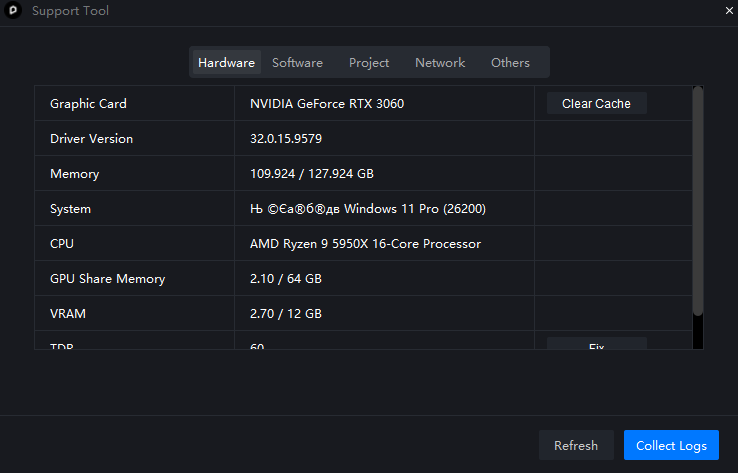
Could you also please send a screenshot of your D5 System Info panel? This will help us verify the GPU and environment details from our side.
1 Like
✦
Found the cause! ✦
LOGS: zziplog.zip (1.1 MB)
D5 Render is closing due to a buffer overflow error (BEX64) in the vulkan-1.dll library.
Main error information:
     - Type: Buffer Overflow Exception
     - Failed module: vulkan-1.dll (version 1.4.321.0)
     - Exception code: c0000409 (STATUS_STACK_BUFFER_OVERRUN)
 Priority solutions:
-
Update the Vulkan Runtime (most likely)
- Download from LunarXchange
- Or in the NVIDIA App, select “Clean Install” for the driver (unlikely that it’s him)
-
Reinstall Visual C++ Redistributable (
 most likely)
 -
Disable Steam Overlay (
The second suspect)- A conflicting gameoverlayrenderer64.dll was found in the logs
-
Clear the D5 cache
- Delete: C:\Users\user\AppData\Roaming\D5Config\
- Delete: C:\Users\user\AppData\Local\D5Launcher\
 I can’t say for sure which of these steps caused the problem, as I didn’t test the program after each step. Therefore, I recommend running the program after each new action. You don’t need to restart your computer. If the problem disappears, D5 will launch without any issues.
Hi @varprod
Thanks for sharing this and for listing the steps you tried. If the problem continues, you may share the latest crash log or a screenshot of the error, and we’ll take a closer look. Thanks again for the detailed report! 
1 Like