Another workaround that I found and it works is to clamp max frame rate to lower than screen frame rate like 58 or 115 while using 120hz. But I must set frame generation to x4 using 120hz because x3 is too low to achieve stable 115 frames in D5 and it start to flicker again.
Unfortunately clamping frame rate cause that final rendering is 3-4 times slower and final rendering is always without cloud shadows at all ! I tested accumulation before.
So there is no workaround for that at the moment. This is next great feature in D5 after Scatter that doesn’t work as expected in most of complex scenes.
Please see this what is going with clouds while changing layers, amount of objects on the screen, clouds changing random seed :
cloud_shad_layers (2).zip (3.7 MB)
Current cloud system is completely unstable it depends on something strange inside VRam or amount of objects.
Effects - Custom Background completely remove clouds shadow.
It must be connected to internal fps because it sometimes stop to flicker using FPS Booster and Adaptive System Scaling turned off but it looks blurry on my screen resolution 5120x1440
This is why clouds shadows flickering - clouds change shape to low res if too many geometry is on screen : clouds_shape_change_geometry_amount.zip

Hi @Clov this scene has 10gb size and takes near 10 minutes to load. I will try to reduce it but I sent something simpler in this thread too. This whole sky has LOD system implemented based on how many geometry is visible on screen.
Generating cloud completely doesn’t work on some scene complexity level. We must move camera far away to render them correctly. I have LOD disabled.
And this is not VRam problem because I have 4GB still free.
cloud_lod (2).zip (1.2 MB)
Update :
It looks like turning off Hardware-Accelerated GPU Scheduling in Windows settings AND turning off Adaptive System Scaling in D5 finally resolve clouds shadow flickering issue. This time I tested this on final rendering too.
Also clouds LOD is fortunately not included in final rendering too. Drawback is that we don’t see real clouds placement in viewport compared to final rendering and there is difference in cloud shadow intensity casted on walls because of this.
D5 SR image rendering cause that cloud LOD is included on final rendering  It produce wrong shadow intensity. Right is without SR :
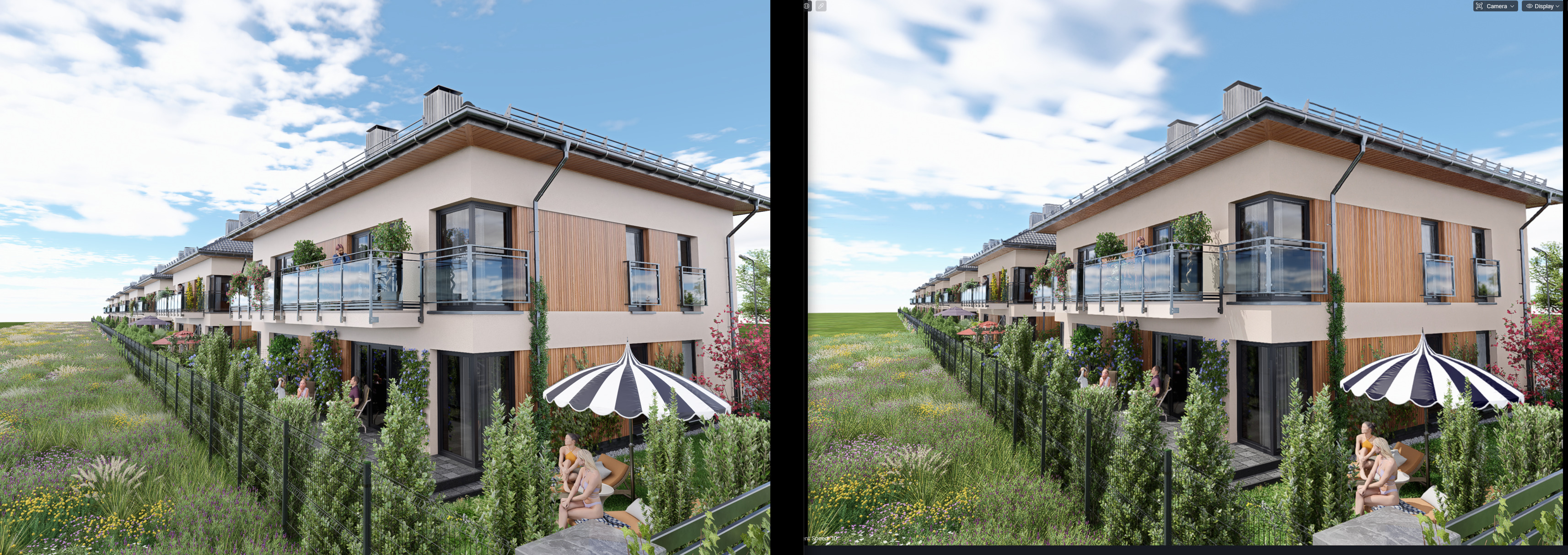
So it looks that sky clouds have internally enabled SR when scene complexity grows.
Another test using Hardware-Accelerated GPU Scheduling ON. Please see that if FPS rate is the same as system one shadows are fine. If camera is close to settlement where fps during accumulating fall below 60hz there is light leaking because of sky LOD that is automatically turned on when fps falls below system refresh rate.
shadow_light_leaking_fps_lower_than_system_refresh_rate (2).zip
Strange that GPU Scheduling OFF can partially repair this issue.
Hi @Smolak
Alright, you may generate a wetransfer link or google drive link containing the zipped file. Our team is waiting to test your file. Thank you.
Hi @Clov,
I will send you link in private message within 1-2 days when scene will be finished.
To play with it you should have 64GB Ram and RTX 5090 because 32GB Vram is probably needed.