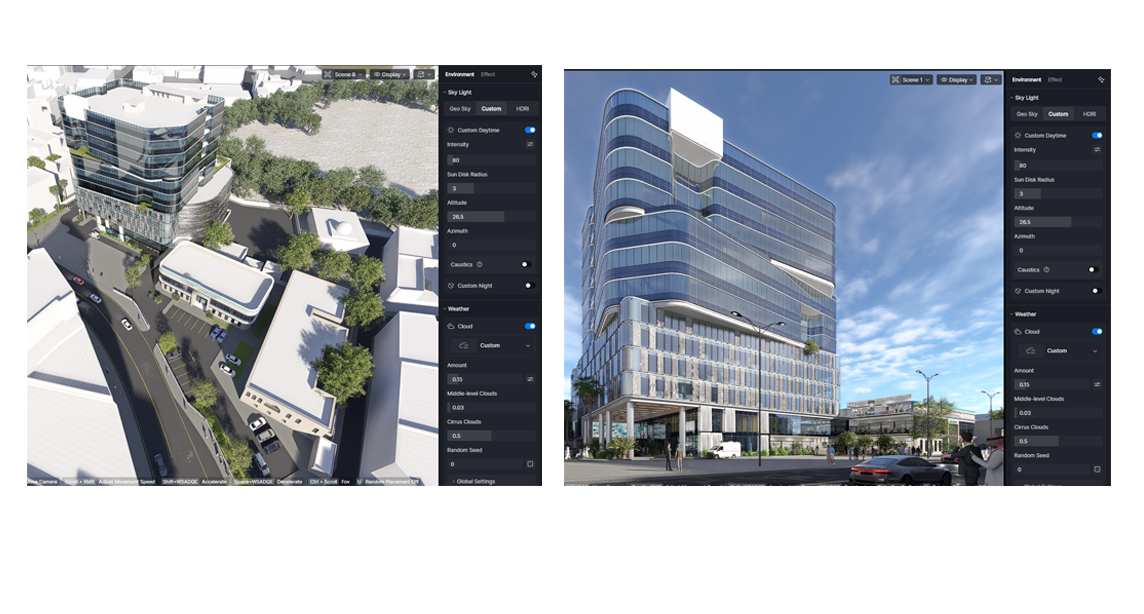
Im working on a project having curtainwall across its facade. In the eye level view, shown here, the glazing picks up the color from the sky which makes it bluish and is kinda normal to me. On the other hand at the aerial view it becomes greenish (which is the actual tint) and becomes pretty much transparent . Notice also the dark glass in the normal eye level view becomes black in the aerial shot. Both view use the same setting of custom environment. (im using 3.0.1 version)
Upon further testing on your file. We think it’s perfectly normal:
From a human’s eye-level perspective, both the reflection and refraction of glass show the sky;
But from a bird’s-eye view, the reflection shows the ground, while the refraction shows the interior, where there’s no light at all, hence the glass appears transparent.
Note: You may also want to use the same settings that are applied in one of the scenes just to make the results closer.