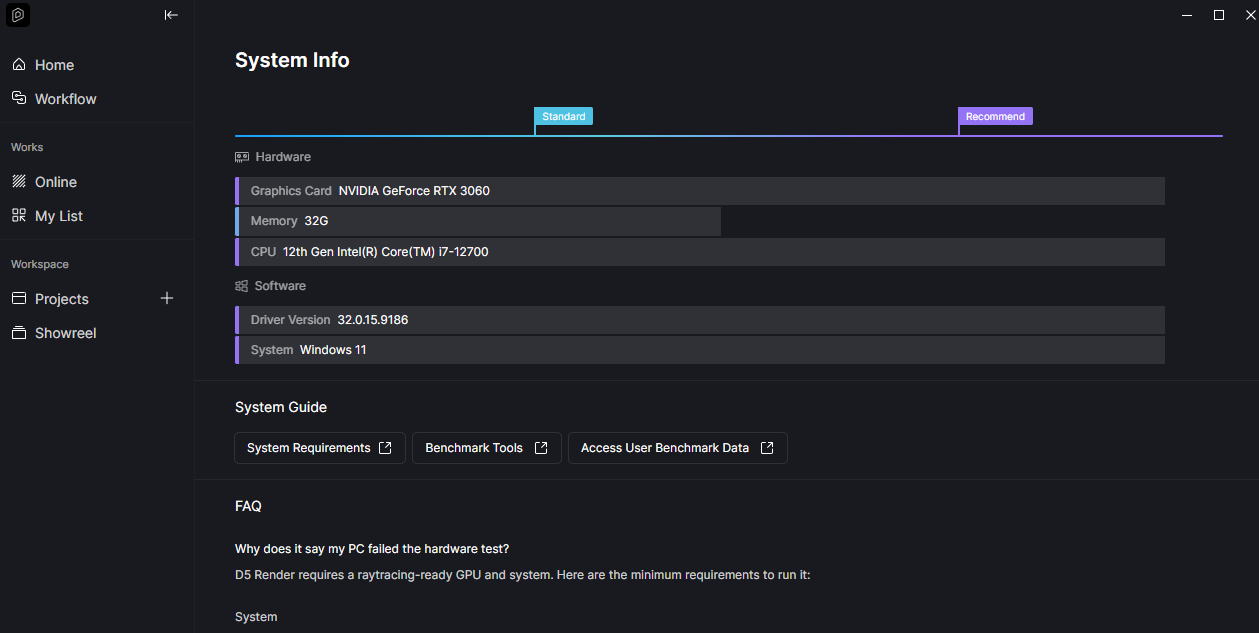
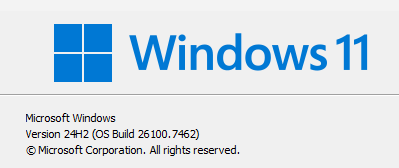
No worries @ela thank you for your assistance as well, very much appreciated. Yes I did as instructed but still no fix. I tried using D5 in another PC and it works perfectly fine. I hope the log files could help figure out my problem.
Email received. We’ll look into it and keep you posted on any updates. Thank you
Also, you mentioned that even when rendering an image or importing a PBR material, D5 Render crashes. Could you please share a screenshot of your D5 system info?
Hi @ela , already fixed my issue. Thank you so much for your assistance!
For all who still has this occurring problem, mine had to do with the latest windows update. Try going back to the previous version and then doing the suggested troubleshoot and you should be good to go.
Thank you so much for the update and for sharing the solution with the community — that’s really helpful.
If you don’t mind, could you please let us know which specific Windows 11 version was causing the issue? This would be very useful for reference and for helping other users who may encounter the same problem.
I am using Windows 11 version 26200.7705, which is the latest version, but this issue still hasn’t gone away for me.
Whenever D5 tries to open Windows File Explorer for any reason, it crashes and closes itself.
@zatandoc and @azlykasroh I think it depends on if you install D5 for just yourself or for all users. Try looking here: C:\Users\YOURUSERNAME\AppData\Roaming\D5 Render
tengo el mismo problema, donde puedo encomtrar los archivos del programa?? no me salen…
ya reinicie hasta mi lap y siguio igual, al renderiar una imagen y elegir archivo no se crasheo pero cuando termino si, esto ya con la computadora reseteada…
ya se actualizaron los drivers de la grafica
del win11
se refrescaron los programas
se reinstalaron
y nada
I am currently facing an issue with D5 Render related mainly to saving render locations and project syncing .
D5 crashes whenever I try to choose or change a save location for renders . As soon as the file explorer window opens to select the folder, the application crashes.
Previously, I was also encountering an error message stating that there was a problem syncing to an existing project , which prevented normal synchronization. Because of this, I had to manually sync the project by opening D5 first and then syncing from SketchUp, instead of using the usual workflow.
I would like to clarify that this is not related to system instability:
My laptop has been freshly formatted with a clean installation of Windows 11
The motherboard has been replaced
All drivers are fully updated
Other applications work normally
The issue occurs specifically with D5 Render
Due to this problem, I currently have to avoid opening file dialogs inside D5, especially when setting render output locations, which makes the workflow very difficult.
I have tried the Locate and Rename the Autodesk DLL/plugin method but did not work, and im not an active user of claro drive
Please let me know if this is a known issue, and if there are any recommended fixes, settings, or logs I can provide to help resolve it.
Thank you for your time and support. zziplog.zip (1.6 MB)