D5 Render Version: 3.0.1.0683
Graphics Card: RTX3070Ti
Driver Version: 591.86
Issue Description:
I just updated my version of D5Render and got an error at the end of the installation (see log).
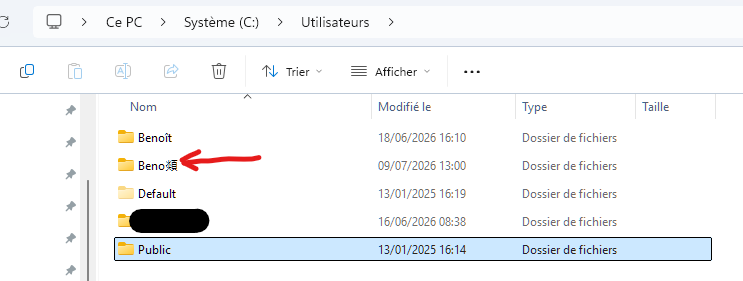
The problem is with the Windows user account name, because my account is “Benoît” and it installed everything under “Beno顃”.
I then uninstalled and reinstalled everything, but the result is the same.
Screenshots/Videos Description:
Log:
2026-07-09 13:07:27 Log file path: C:/Users/Benoît/AppData/Local/Temp/D5Logs/d5_deploy_2026_07_09_13_07_27.log
2026-07-09 13:07:27 start verifying installer signatures…
2026-07-09 13:07:27 Installer signature verified: C:/Users/Benoît/AppData/Local/Temp/D5DeployPackage/D5Launcher-windows-1.1.1.0009.exe
2026-07-09 13:07:34 Installer signature verified: C:/Users/Benoît/AppData/Local/Temp/D5DeployPackage/D5_Render_installer-3.0.1.0683.exe
2026-07-09 13:07:34 Starting D5 Product Deployment…
2026-07-09 13:07:34 Installing D5Launcher from: C:/Users/Benoît/AppData/Local/Temp/D5DeployPackage/D5Launcher-windows-1.1.1.0009.exe
2026-07-09 13:07:34 skip source command for install launcher
2026-07-09 13:07:34 Launching installer for D5Launcher…
2026-07-09 13:07:34 Installer started for D5Launcher
2026-07-09 13:07:34 Installation progress for D5Launcher: 0%
2026-07-09 13:07:35 Installation progress for D5Launcher: 6%
2026-07-09 13:07:35 Installation progress for D5Launcher: 10%
2026-07-09 13:07:35 Installation progress for D5Launcher: 25%
2026-07-09 13:07:36 Installation progress for D5Launcher: 28%
2026-07-09 13:07:36 Installation progress for D5Launcher: 32%
2026-07-09 13:07:36 Installation progress for D5Launcher: 44%
2026-07-09 13:07:36 Installation progress for D5Launcher: 57%
2026-07-09 13:07:36 Installation progress for D5Launcher: 69%
2026-07-09 13:07:37 Installation progress for D5Launcher: 86%
2026-07-09 13:07:37 Installation progress for D5Launcher: 93%
2026-07-09 13:07:37 Installation progress for D5Launcher: 99%
2026-07-09 13:07:38 Installation progress for D5Launcher: 100%
2026-07-09 13:07:38 D5Launcher installed successfully
2026-07-09 13:07:38 Start check installation files…
2026-07-09 13:07:38 D5Launcher install success, installPath: C:/Program Files/D5/D5 Launcher
2026-07-09 13:07:38 Installing D5Render from: C:/Users/Benoît/AppData/Local/Temp/D5DeployPackage/D5_Render_installer-3.0.1.0683.exe
2026-07-09 13:07:38 skip source command for install render
2026-07-09 13:07:38 Launching installer for D5Render…
2026-07-09 13:07:38 Installer started for D5Render
2026-07-09 13:07:42 Installation progress for D5Render: 0%
2026-07-09 13:07:42 Installation progress for D5Render: 39%
2026-07-09 13:07:42 Installation progress for D5Render: 43%
2026-07-09 13:07:43 Installation progress for D5Render: 44%
2026-07-09 13:07:43 Installation progress for D5Render: 45%
2026-07-09 13:07:43 Installation progress for D5Render: 46%
2026-07-09 13:07:43 Installation progress for D5Render: 47%
2026-07-09 13:07:43 Installation progress for D5Render: 48%
2026-07-09 13:07:44 Installation progress for D5Render: 50%
2026-07-09 13:07:44 Installation progress for D5Render: 51%
2026-07-09 13:07:44 Installation progress for D5Render: 52%
2026-07-09 13:07:44 Installation progress for D5Render: 54%
2026-07-09 13:07:44 Installation progress for D5Render: 55%
2026-07-09 13:07:45 Installation progress for D5Render: 56%
2026-07-09 13:07:45 Installation progress for D5Render: 58%
2026-07-09 13:07:45 Installation progress for D5Render: 59%
2026-07-09 13:07:45 Installation progress for D5Render: 60%
2026-07-09 13:07:46 Installation progress for D5Render: 61%
2026-07-09 13:07:46 Installation progress for D5Render: 62%
2026-07-09 13:07:46 Installation progress for D5Render: 63%
2026-07-09 13:07:48 Installation progress for D5Render: 67%
2026-07-09 13:07:48 Installation progress for D5Render: 69%
2026-07-09 13:07:48 Installation progress for D5Render: 71%
2026-07-09 13:07:48 Installation progress for D5Render: 72%
2026-07-09 13:07:49 Installation progress for D5Render: 73%
2026-07-09 13:07:49 Installation progress for D5Render: 74%
2026-07-09 13:07:49 Installation progress for D5Render: 75%
2026-07-09 13:07:50 Installation progress for D5Render: 76%
2026-07-09 13:07:50 Installation progress for D5Render: 77%
2026-07-09 13:07:50 Installation progress for D5Render: 78%
2026-07-09 13:07:53 Installation progress for D5Render: 79%
2026-07-09 13:07:54 Installation progress for D5Render: 80%
2026-07-09 13:07:56 Installation progress for D5Render: 81%
2026-07-09 13:07:56 Installation progress for D5Render: 83%
2026-07-09 13:07:57 Installation progress for D5Render: 84%
2026-07-09 13:07:58 Installation progress for D5Render: 85%
2026-07-09 13:07:58 Installation progress for D5Render: 86%
2026-07-09 13:07:59 Installation progress for D5Render: 87%
2026-07-09 13:07:59 Installation progress for D5Render: 88%
2026-07-09 13:08:00 Installation progress for D5Render: 89%
2026-07-09 13:08:00 Installation progress for D5Render: 90%
2026-07-09 13:08:01 Installation progress for D5Render: 92%
2026-07-09 13:08:01 Installation progress for D5Render: 93%
2026-07-09 13:08:02 Installation progress for D5Render: 94%
2026-07-09 13:08:03 Installation progress for D5Render: 95%
2026-07-09 13:08:03 Installation progress for D5Render: 96%
2026-07-09 13:08:04 Installation progress for D5Render: 97%
2026-07-09 13:08:05 Installation progress for D5Render: 98%
2026-07-09 13:08:06 D5Render installed successfully
2026-07-09 13:08:06 Start check installation files…
2026-07-09 13:08:06 D5Render installation verification failed at path: C:\Users\Benoît\AppData\Roaming\D5\D5 Render\d5_launcher.exe