I am an architecture student currently working on my projects using SketchUp 2026 together with D5 Render. Unfortunately, I have been experiencing a serious issue for quite some time, and despite trying many troubleshooting steps, the problem has not been resolved.
The issue occurs while I am working on my projects. After using D5 Render for a while, the program suddenly freezes. The window turns white and Windows displays either “Not Responding” or asks me to wait for the program to respond. Eventually, I have to force close D5 Render.
After closing the program, I often cannot reopen it. During startup, D5 Render reaches a certain loading percentage and then closes automatically without any error message.
In many cases, when I restart or shut down my computer after the crash, Windows displays a message saying that Microsoft/Windows has encountered a problem and needs to restart. After rebooting, I can use D5 Render again for a while, but eventually the exact same issue happens again. This cycle repeats continuously.
My laptop specifications are:
Dell G15 5530
13th Gen Intel Core i9-13900HX
NVIDIA GeForce RTX 4060 Laptop GPU (8 GB VRAM)
32 GB RAM
1 TB SSD
Windows 11
These specifications are well above the recommended requirements for D5 Render. I have also used D5 successfully on computers with lower specifications, which makes this issue particularly confusing.
I sent my laptop to Dell’s authorized service center for inspection. After their diagnostics, they informed me that they could not detect any hardware faults.
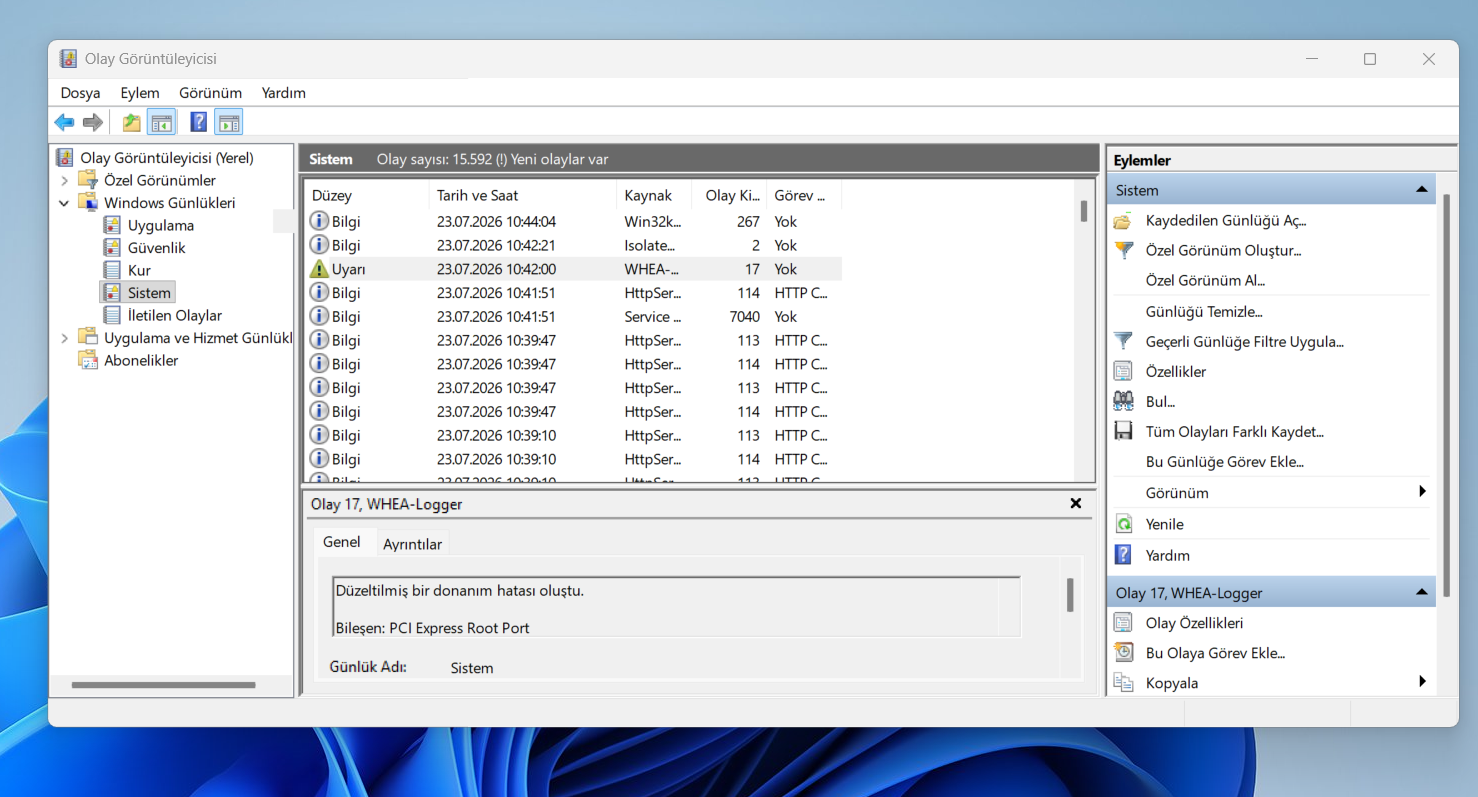
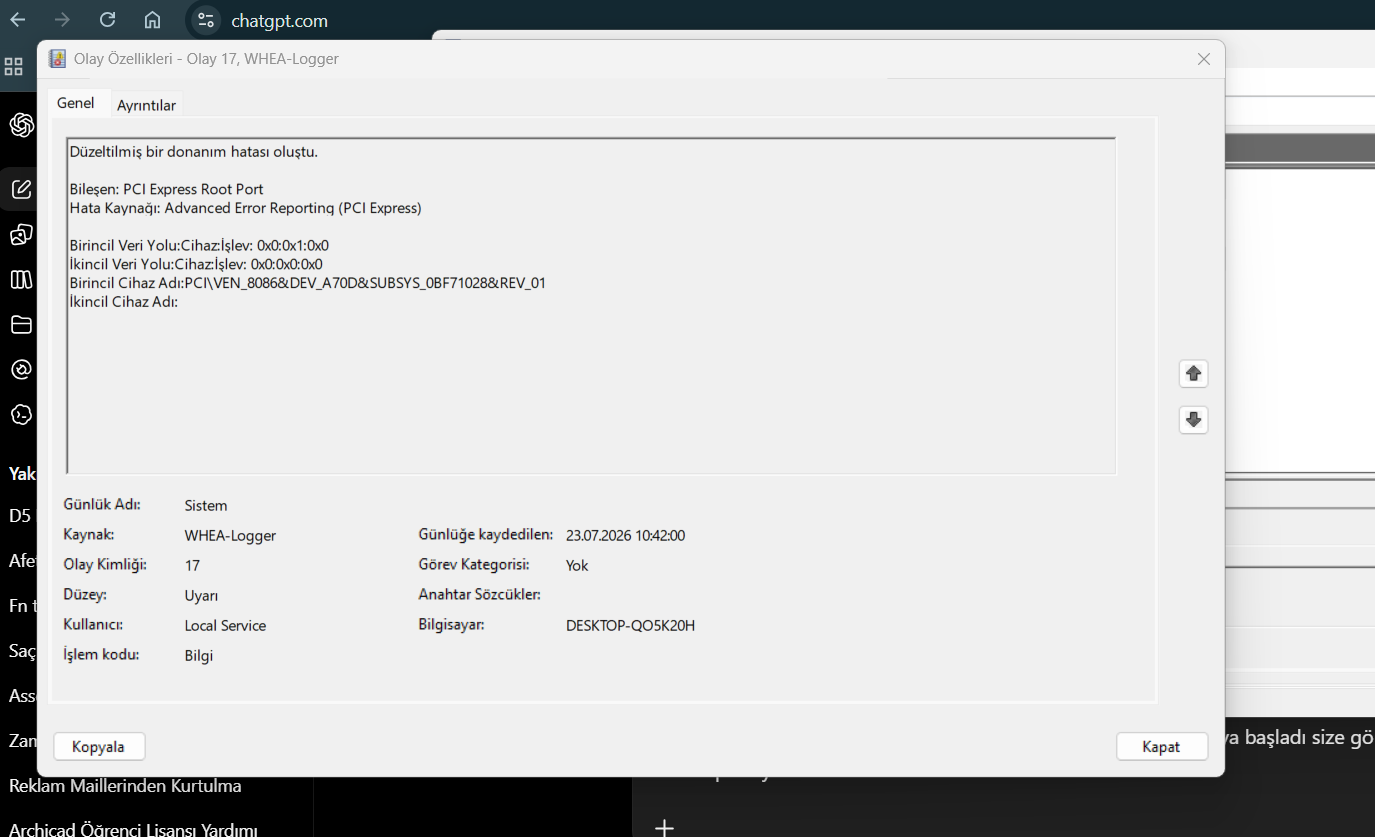
However, while using D5 Render, Windows Event Viewer repeatedly reports WHEA-Logger Event ID 17 warnings related to PCI Express Root Port (Advanced Error Reporting - PCI Express). I have attached screenshots of these error messages for your reference.
I would like to ask:
I don’t understand the root cause of the problem or what’s causing it. Can you help me with this?
I would greatly appreciate any guidance or suggestions you can provide, as this issue is preventing me from working reliably on my university projects.
Thank you very much for your time and support. I look forward to your response.
Thank you for providing such a detailed description of the issue, as well as your laptop specifications and the Event Viewer screenshots.
Based on the information you’ve shared, the repeated WHEA-Logger Event ID 17 warnings indicate that Windows is detecting corrected PCI Express (PCIe) hardware communication errors. Specifically, the warning points to a PCI Express Root Port, which is part of the Intel chipset rather than D5 Render itself.
Why does D5 trigger it?
D5 Render is among the most demanding applications you can run. It stresses simultaneously:
- RTX GPU
- VRAM
- PCIe bus
- CPU
- SSD
- memory bandwidth
If anything is unstable, D5 will usually expose it before lighter applications do. This is why games may work while D5 crashes.
We recommend trying the following if you haven’t already:
- Update your Dell BIOS to the latest available version.
- Install the latest Intel chipset drivers provided by Dell.
- Perform a clean installation of the NVIDIA Studio Driver. If possible, use Display Driver Uninstaller (DDU) before reinstalling the driver.
- Disable PCI Express Link State Power Management in your Windows Power Options.
- Monitor your CPU and GPU temperatures and power usage while running D5 Render to ensure the system is not experiencing thermal or power-related instability.
You may also try reverting to 3.0.1 and see if the issue persists.
- Previous Version link: Download Historical Versions of D5 Render - Get Help - D5 RENDER FORUM
If it does persists, please send us the ff:
- 3.0.1 Logs (generated using 3.0.1)
- 3.1 Logs (generated using 3.1)

