Hi D5 team,

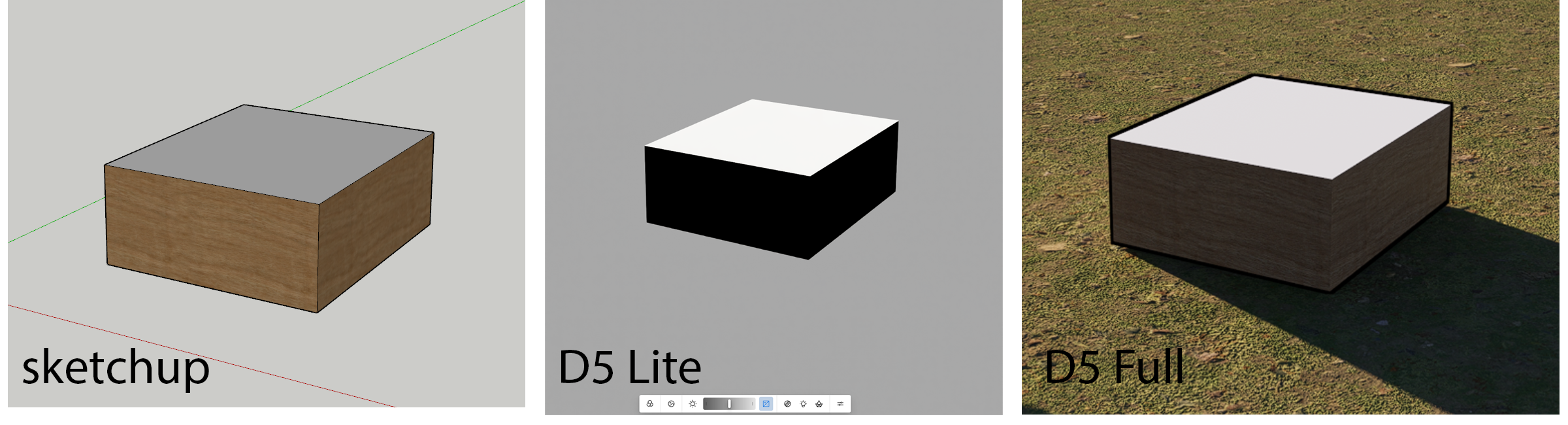
In D5 Lite for SketchUp, every material that uses an image texture renders black in the Lite viewport. Solid-color materials look normal. The same model shows all textures correctly in the full D5 Render interface (D5 LiveSync).

The problem also happens in a brand-new empty scene: I draw a single cube, apply a stock SketchUp texture (e.g. wood), open D5 Lite, and the cube is black. (Screenshots attached: SketchUp view, D5 Lite view, and the same cube in D5 Render.)

System:
- Windows 11
- GPU: NVIDIA GeForce RTX 5080, driver 621.24-desktop (Studio)
- SketchUp 2026
- D5 Lite version: 1.8.0
- D5 Render version: 3.1.1

What I have already tried (no change):
- Moved the model and textures to C:\Proje (no Turkish characters / not in OneDrive)
- Created a new Windows user account with an ASCII-only name ("Test") and reinstalled/tested there: same result
- Disabled Hardware-accelerated GPU Scheduling (HwSchMode = 1) and rebooted
- Updated the NVIDIA driver with a clean installation
- Switched SketchUp's graphics engine (Classic / New)
- Disabled / removed D5 LiveSync and reinstalled D5 Lite
- Checked face front/back materials and applied different textures
- Loaded a base color map manually inside D5 Lite: still black

Could you tell me if this is a known issue with RTX 50-series GPUs or SketchUp 2026, and where I can find the D5 Lite log files so I can send them to you?

Thank you!