**D5 Render Version:**3.0.1.0683 (Lite version 1.4.0)
**Graphics Card:**NVIDIA GeForce RTX 5060 Ti (16 GB)
**Driver Version:**Latest
I am coming from Enscape, so new to D5. I’m having trouble with D5 Lite not saving my work, even as I’m in the same session. (I do have a scene set up in D5 Lite, and have read that I need to use the scene list there, rather than SketchUp.) So here’s an example of a problem I’m encountering:
(1) I open up D5 Lite and click on the scene I already created.
(2) I do some work in D5 Lite (e.g., customize the sun in the environment tab).
(3) I click to update the scene in D5 Lite (presumably so those changes are saved).
(4) I do some work in SketchUp with D5 Lite still open. Even just navigating around a bit causes the problem described in step 5.
(5) I go back to D5 Lite and click on the scene window to, presumably, pick up where I left off. But, doing so undoes all of the changes I made (e.g., customizing the sun). This also happens if I click the corresponding scene in SketchUp.
What am I doing wrong? Why are none of my changes saving?
I attempted the process on my end, but I was unable to replicate the issue. After modifying the environmental settings, I updated my scene and then edited the 3D model in SKP. I also tried closing D5 Lite while keeping it running in the background, but the changes were still visible.
Could you please do the following:
Send us a video recording of you performing this process.
Check the location of your file; it should preferably be saved on your local C or D drive.
Hi. Thanks so much for your help. I created a video but there doesn’t appear to be a way to upload video files. If you send me an email I am happy to send it that way. I have tested this problem in two different files, and both were saved locally.
I have a scene created, I make a change in D5 Lite (in this case, in the Environment tab), I update the scene in D5 Lite to save my changes. I go back to SU, even just to navigate. I return to D5 Lite and click on the scene so that I can get the correct camera view back, and the changes I made previously disappear. I have tested this in two different files. Let me know what I’m doing wrong. Thanks.
I tried replicating it on my end but any changes made will not be reverted back once I click on “Update Scene”. I also tried it on different views in SKP such as Perspective, Iso, and Two-points perspective. They’re all normal.
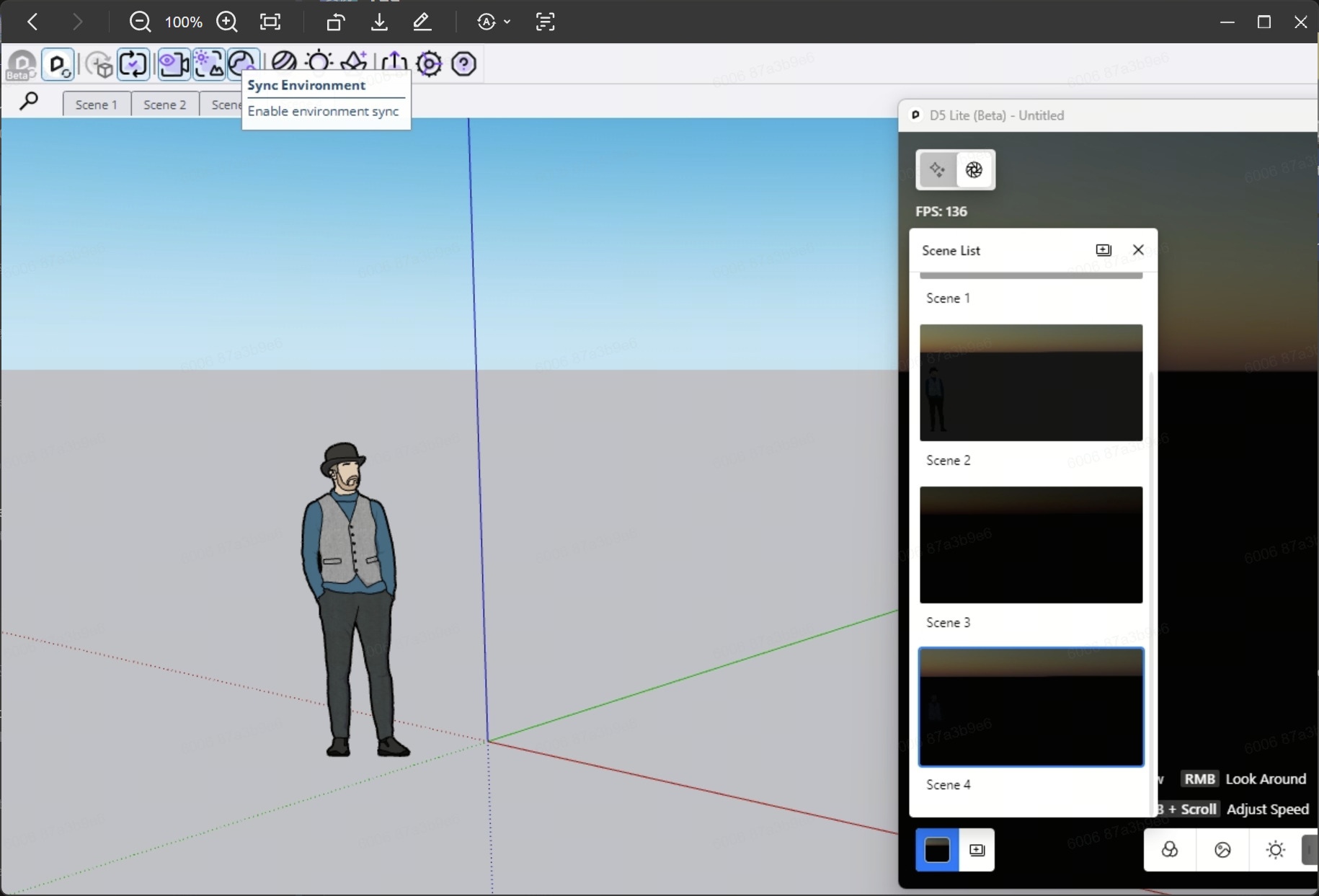
Hi. Turning that off appears to have fixed the problem. I am glad about that, and I thank you, but I’m really annoyed that (a) that setting is on by default when you open D5 Lite (b) in no training materials/videos I’ve come across, including from D5, did it say that the first thing you need to do when you open D5 Lite is toggle that off (or make sure it’s off) in order for your changes to save and for the program to function as demonstrated in the videos. So frustrating.
I am curious if there’s a point in the workflow at which that needs to be turned on? Just wondering why it’s there.
I’ll continue to play around with D5/Lite and let you know if I encounter any more hiccups. Thanks.
This setting operates under the same logic as other features such as live sync, sync once, and sync viewpoint options. It will inherit the last operation performed: if syncing was enabled during the last session, it will also be enabled for the next synchronization.
Please note that this feature is turned off by default during the initial installation.
1.【Sync Environment】 setting
follows the same logic as other functions (ivesync/sync once, sync viewpoint or not, etc.):
it inherits the previous operation (if it was enabled during the last synchronization, it will also be enabled during the next synchronization).
This feature is disabled by default during initial installation.
2.【Sync Environment】 function
After enabling 【Sync Environment】, Lite Geographical Sky (custom sun) will follow the information in SU shadow; Lite HDRI information will be retained
For instance, when enabling the synchronization environment, the parameter in SU shadow is mapped to A in Lite, manually adjusted to B in Lite custom sun, and set to C in Lite HDRI; the next time Lite custom sun displays A, and switching to Lite HDRI still displays C.
I recognize that I may have changed that setting inadvertently; I think the import of such a setting should be explained in the videos on how to use the product.