Could someone please help me with this problem? Now, every time I enable Triplanar on any material, it loses its texture and has a shiny, textureless finish. I don’t know why this is happening; it didn’t happen before, and I don’t remember updating or changing any settings on my computer. My computer has an AMD Radeon RX 7900 XT with 20 GB of RAM. I’ve attached an image showing how the wall, floor, and countertop materials look with and without Triplanar.
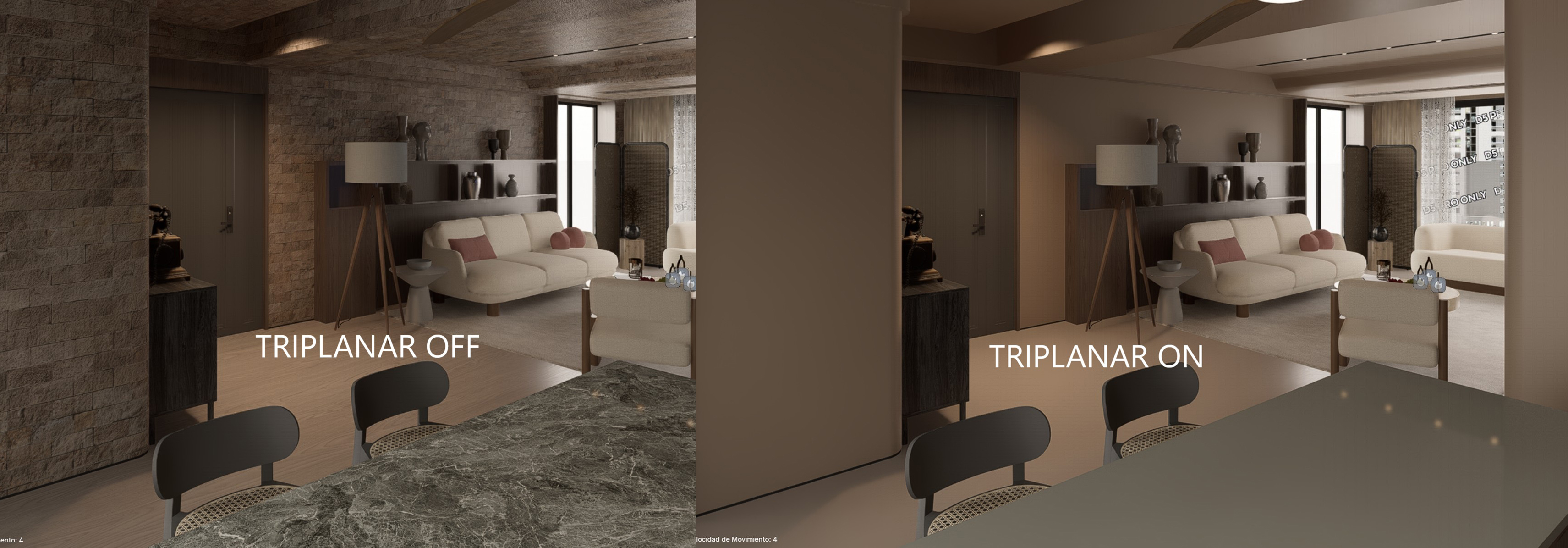
1 Like
Hi @jorgeaz_17
Apologies for any inconvenience caused. To help us investigate the Triplanar issue, could you please provide the following details:
- What version of D5 Render are you using?
- Is the affected material using a custom template or another template (e.g., Displacement)? Some templates don’t fully support Triplanar.
- Does the Triplanar mapping appear correctly in another project? Please check if this issue is file-specific.
- Are you applying Triplanar to grouped geometry or individual objects?
- Which modeling software and import workflow are you using (e.g., SketchUp with Converter, FBX, etc.)?
I look forward to your reply. Thanks in advance
Hi Ela:
- D5 Version: 3.0.0.0676
- The affected materials use a Custom template, but I have also seen, for example, that Cloth materials are also affected.
- No, the problem persists in all projects I open, including old projects where materials that had Triplanar worked correctly.
- I’m trying both cases, and it doesn’t work in either. It also happens when I apply the material to basic models available in the Assets.
- Sketchup 2024 with the D5_LiveSync_Sketchup_usa_1.7.0.0001 plugin.
Thank you so much for your help. Triplanar used to work perfectly; I don’t know what could have happened.
That sometimes happens to me, and always is related to a UV scale problem, or even custom normals on the model. I work with Blender and my solution is always to unwrap and clear custom normals. Hope it helps. Oh! and don’t forget to apply scale and rotation on the model!
Hi, thanks for your reply. I tried changing all the UV settings, including scale and rotation, also the normal maps of the custom materials, but nothing works. Could you please explain to me how to clear custom normals?. For now, I’m working with materials without Triplanar. The good thing is that in most cases Triplanar isn’t necessary, but unfortunately, in some specific cases of irregular surfaces where I do need it, I haven’t been able to use it anymore.
Hi @jorgeaz_17
In SketchUp, the workflow is a bit different, since SketchUp does not support UV unwrapping or custom normals the same way Blender does.
Could you please try the following:
- Switch to View → Face Style → Monochrome and make sure all faces are front faces (white). Back faces often cause shading and texture issues in render engines.
- Explode the object, then regroup it to reset the internal scale. Non-uniform or nested scaling can cause texture mapping to break.
If the issue persists after trying these, please collect you log files and send it to support@d5techs.com. Please tag me in your email and include the link to this forum thread. Thank you in advance
1 Like
OK, I already sent the email with the log file since the problem persists. Thank you very much again!
Hi @ela , I finally found the solution and it’s very simple. I just had to disable “FPS Booster for Complex Geometry” in the menu and Triplanar immediately started working properly again.
I hadn’t realized this option was enabled because I’d never seen it before, but now that I’ve disabled it, it’s working fine. Thanks for everything.
Hi @jorgeaz_17
Thanks for the update — that’s great to hear! If you encounter any other issues or notice anything unusual again, please don’t hesitate to let me know. I’ll be happy to assist.
I would like add something else to this problem. I have the exact same issue, when i turn on the triplanar setting, my texture disappear. But i noticed something else.
Actually, i have two workstations. The first one, at my office, with an old RTX 2070 Super. Everything works nice, even with “FPS Booster for Complex Geometry” turned on when i use the triplanar settings.
But at my home, i have an AMD RADEON 7900 XT and this time i have to use your solution to fix the issue. So my guess, this bug is tied to AMD graphics card or AMD drivers ? That’s weird we can’t use the “FPS Booster” and triplanar at the same time, if it’s already working properly on NVIDIA Card.
Does D5 Team have an explanation or solution ? Other than that turned off FPS BOOSTER to fix the issue ?