VR connection problem

Hi,
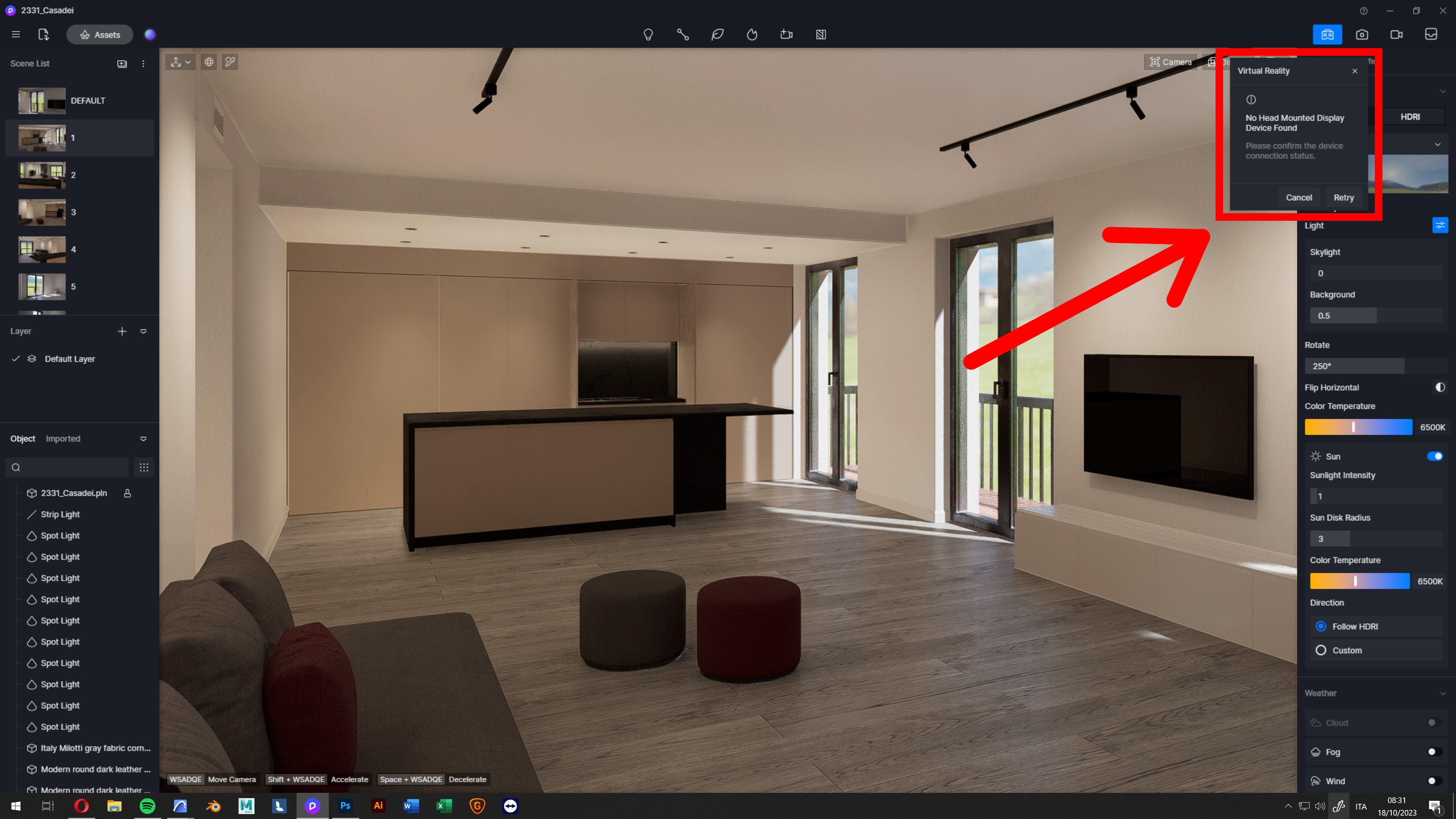
I recently purchased the PRO version of the software, and I’m trying to connect my Oculus Quest 2 using the beta feature. However, every time I try to connect it by pressing the button in the top right, it tells me that it’s unable to find a connected device…
Since the procedure isn’t clear, can someone explain to me in detail how it’s done?
Thanks
Lorenzo

Ciao, ho lo stesso problema, sei riuscito a risolverlo?

Ciao Noemi, purtroppo no…e nessuna notizia da D5 Render…

Hi @l.dragotto @noemipp

  1. Please activate the widget first, then close D5 completely.
  2. After closing D5 Render, please connect your VR Device
  • For Oculus devices, please connect to Oculus program for PC. For reference,

Use Oculus Link with Meta Quest 2 or Meta Quest | Meta Store (facebook.com)

Connecting your Meta Quest 2 to your PC with Oculus Air Link | Meta Store (facebook.com)

  • For other devices, please connect to Steam VR

SteamVR on Steam (steampowered.com)

  1. After successful connection to Oculus or SteamVR, launch D5 Render and turn click the VR Icon.

Let me know if this helps, thank you.