My scatter textures suddenly start missing. Please help.

Is your file path too long? This issue commonly occurs with D5 files stored in long paths. Most users have resolved this problem by taking the following steps:
SOLUTION
-
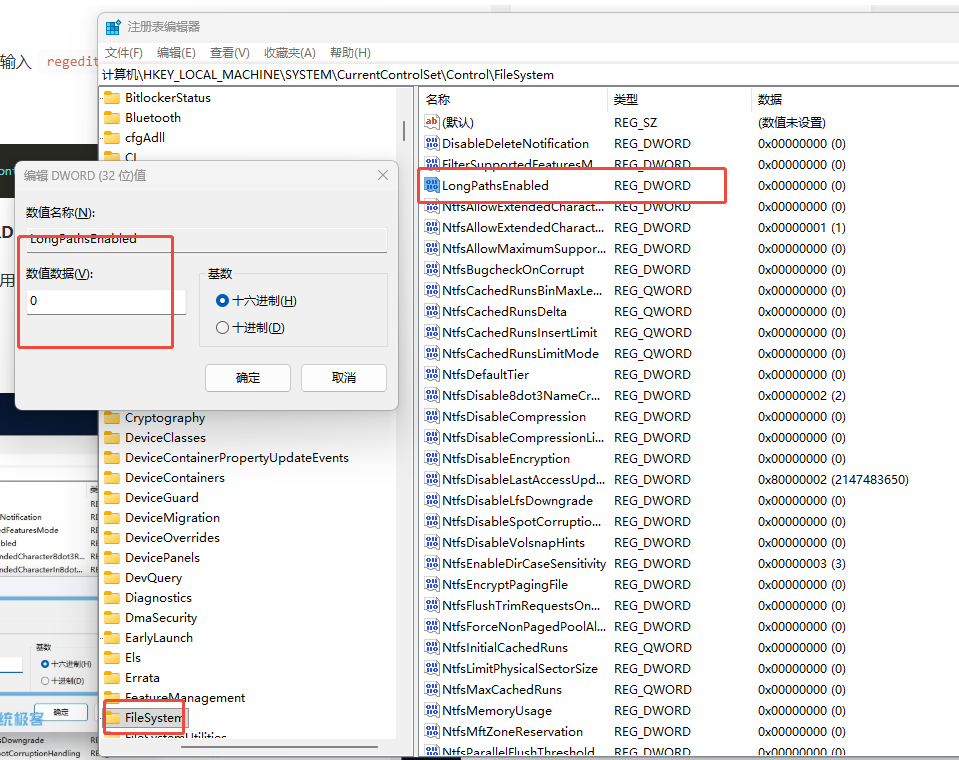
Press Windows Key + R, type regedit, and hit Enter
-
Navigate to: HKEY_LOCAL_MACHINE\SYSTEM\CurrentControlSet\Control\FileSystem
-
Find the entry LongPathsEnabled.
- If it doesn’t exist, right-click, select New > DWORD (32-bit) Value, and name it LongPathsEnabled.
-
Double-click LongPathsEnabled and change the value data to 1
-
Restart your computer
Solved, Thanks for help.