I created a number of sequential scenes for an animation. I went back to the first scene and changed the effects. I created a preset of those changes and saved it. I then went to the next scene and applied the presets… And so on for all the scenes. I went back to the first scene, and the presets were no longer there. Nor were they there for any of the other scenes. I’ve tried various ways of getting the presets to stick with the scenes, but they always revert back to their original state when i leave them and come back. Is there a step i am missing or is it the case that once a “scene” is created, all conditions of that scene are locked in?
Because presets apparently don’t stay with a scene after it has become a “scene”, i did a PIA work around. I open scene 1, add the preset to it and then while still at that scene, create a new scene and label it 1-b. Now i have a scene that keeps the preset i applied to it. For a set of sequential scenes already established for a video clip, i repeat for all those scenes. This gives me a set of “b” scenes that can now be used to create a new video clip, clip “b”…since i have already created clip “a”. Once i’ve set up the sequential “b” clips in same order as the “a” clips, all i need to do is adjust the timing of “b” clips to “a” clips timing. But… if i had keyframed anything in clip “a”, i would have to repeat all that in clip “b”. Maybe i could just copy and paste keyframes from one clip to the other but i have not tried that.
Yes, this is expected if the scene hasn’t been updated after you apply the preset.
When you apply an environmental preset, it changes the current D5 environment settings, but it doesn’t automatically write those changes to the scene you previously created. After applying the preset, click the “Update Scene” icon to save the current settings to that scene.
- Scenes: Select Scene 1 → Apply the environmental preset → Click Update Scene
- Clips: Select Clip 1 → Apply the environmental preset → Click Update icon
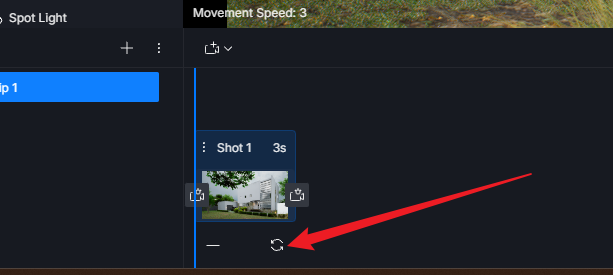
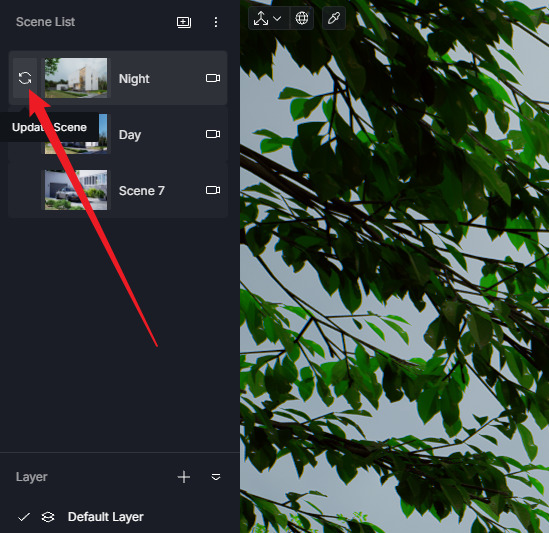
So the scenes are not necessarily locked once created, you can still modify their settings, but you need to Update Scene afterward for those changes to be retained by that scene.