**D5 Render Version: 3.0.1
**Graphics Card: RTX 3080
**Issue Description: I have a problem, the shrubs and vegetation are noisy. I updated the graphic card driver. and I increased the 360 image to 16K but still nothing happened
This falls below expectations. The panoramic image is three times larger than a standard image, which naturally affects its clarity.
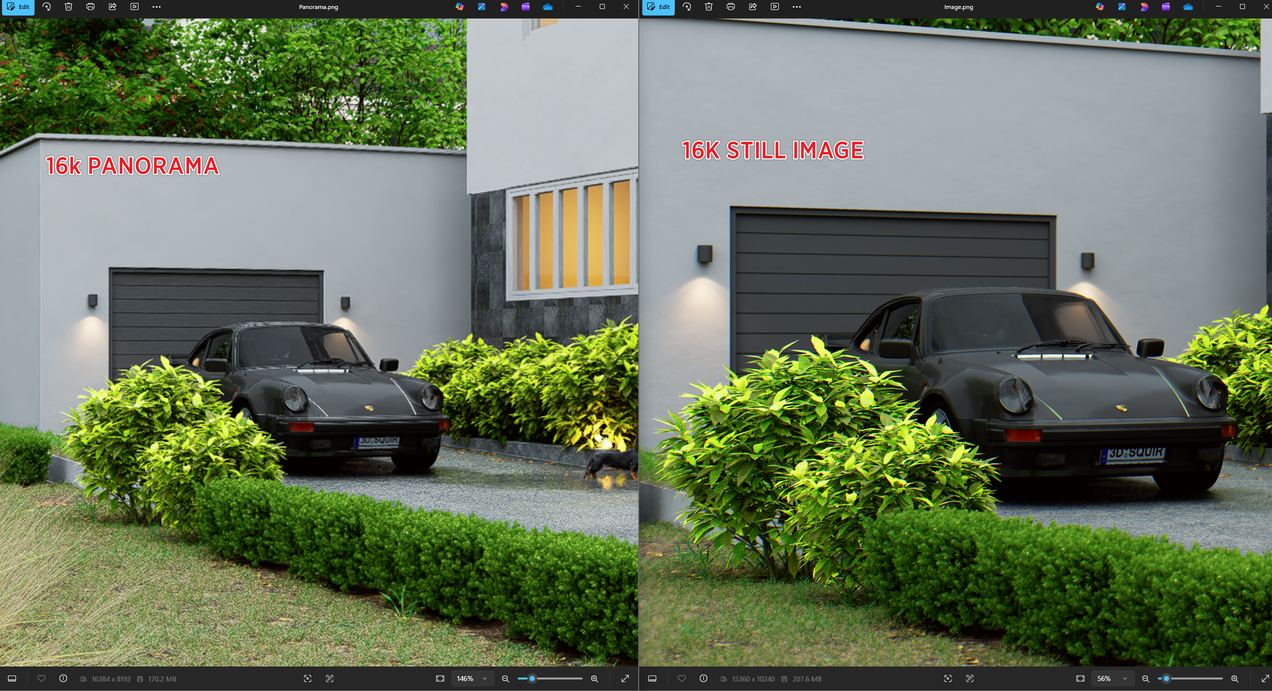
How can I fix this? At the very least, the vegetation should appear slightly blurred with proper anti-aliasing, but right now it looks really strange.
Even though your image is set to 16K, a 360 panoramic image distributes that resolution across the entire sphere, not just a single frame like a standard render.
- In practice, this means the effective resolution per view (what you see when zooming in) is significantly lower compared to a normal 16K image.
In your specific case, I also noticed that the vegetation is quite small and highly detailed. When these fine details are spread across a panoramic image, they tend to lose sharpness more quickly when zoomed in. This is why it appears blurrier compared to a standard 16K render, where all pixels are concentrated in a single view.
To put it simply:
- A standard 16K image = all resolution focused on one frame > sharper when zoomed
- A 16K 360 image = resolution spread across the entire environment > less sharp when zoomed
Additionally, panoramic images are effectively much wider (often 3x or more in pixel dimensions), which further reduces pixel density in any one viewing direction.
Suggestions:
- Try toggling Super Resolution, Frame Generation, or FPS Booster (enable/disable) to see if it affects clarity on your end
- Disable the SR Image widget setting when reviewing the output to ensure you’re seeing the raw render quality