I have recently upgraded to version 3. Since the upgrade I am not able to walk around by using the mouse movement. The mouse wheel does add movement forward and backward but it is not locked at eye level like it was in previous versions… Anyone have a fix? Using a MX Anywhere 3 mouse
Hi @mikecdi3d
Thanks for reaching out. This might be related to the navigation mode or settings after the upgrade.
Could you please check the following:
- Are you currently in Walk Mode or Free Mode?
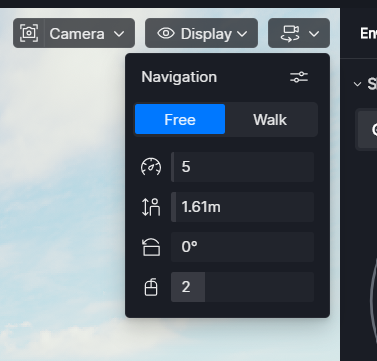
- Have you tried resetting the navigation settings in D5?
- You can also try switching to a different Navigation Preset to see if the behavior returns to how it worked before.
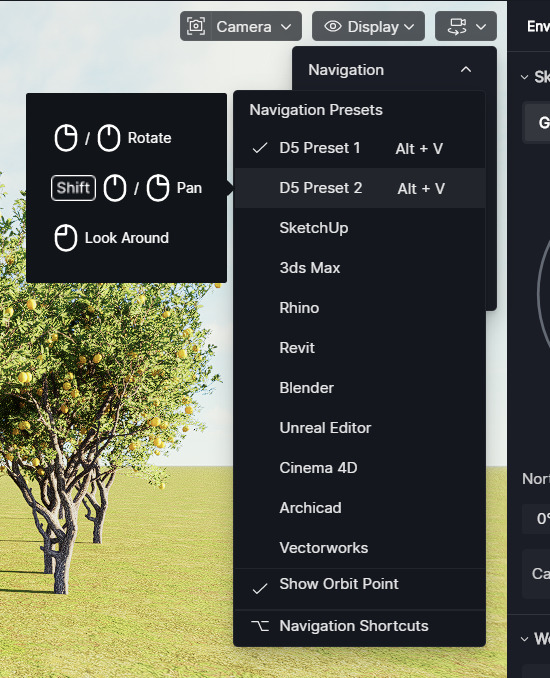
Can you also provide a short screen recording so we can better visualize the issue? Thank you
Thank you for the reply - I am in walk mode currently and have reset the navigation settings. Before I upgraded to ver 3 I use to be able to start walk mode and move around the model by moving my mouse all while keeping the camera at eye level. Hopefully this makes more sense…
Hi @mikecdi3d
Have you changed your mouse recently? Sometimes this behavior can be related to input sensitivity settings. Since you are using an MX Anywhere 3, it may help to check if any custom settings or gestures are enabled in the mouse software that could affect camera control. If possible, can you attach a short screen recording of the behavior? Thank you