Hello, I have a problem in D5 rendering, it’s about light glow
The glow does not appear from far distance; I did all the steps to solve the problem (AI search) like: increase emitting material and glow, stop Auto Exposure (use manual), increase preview cull distance, uncheck level of details on so on. After the adjustment; light glow appears in camera (shoot) but still has some flickering, but in video no light from far distance (as it’s turned off), when camera become near the object; light and its glow appear but irregular with too flickering
Is there a solution for this?
Thank you for your reply
Can you please include a screenshot or a video recording of the issue that you’re currently experiencing?
Lights not being evident when the camera is too far is expected behavior in D5 Render and is due to performance optimization mechanisms.
D5 Render uses a light culling system during real-time preview: lights beyond a certain distance from the camera are automatically hidden to maintain viewport performance.
This only affects the preview visibility; final renders always include all lights, regardless of camera distance.
The same principle applies to other elements like small assets or volume effects (e.g., volume light becomes invisible beyond 100 meters).
Please try the following:
Move the camera closer to the light source to see it reappear in the viewport.
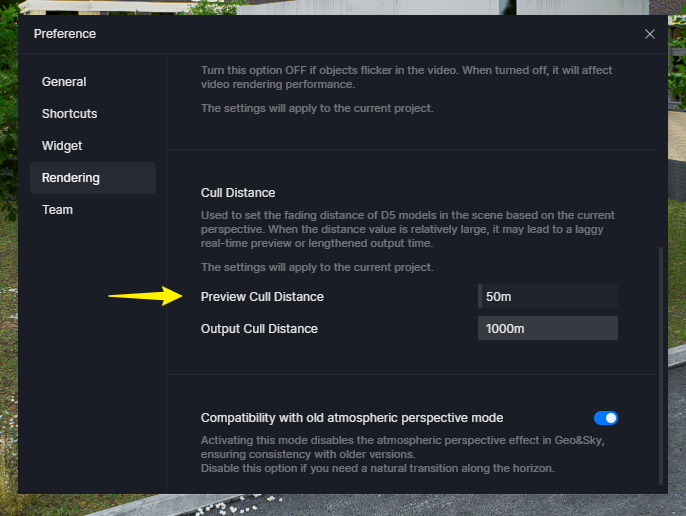
Optionally, increase the Preview Culling Distance:
Go to Preferences > Rendering > Culling Distance Settings
Thank you for the clarification. I don’t believe this issue is related to the cull distance, as I have reviewed the video recording.
The jagged appearance of thin strip lights in D5 Render is currently a known issue.
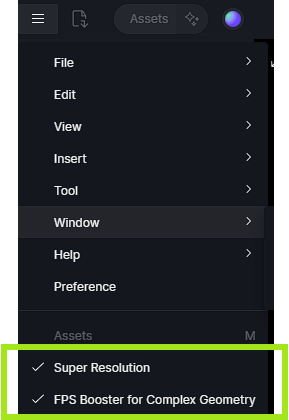
To optimize effects, we recommend the following steps: keep D5 SR off, reduce the Bloom value, and increase the output resolution.
Please check if these suggestions help alleviate the light visibility issue. If the problem persists, kindly send us your file by creating a WeTransfer link or a Google Drive link (with modified permission settings) so we can test it.
Strip Lights/Linear Lights/ Emissive Material is too thin: Due to the backlit nature of the display, the range of self-luminescence is quite limited. From a distance, the light may become so faint that it appears to be only a single pixel and is difficult to see. This is a recognized limitation. If you are far away, you won’t be able to see it at all.
Anti-aliasing issue: This is a known issue. Elements aligned in a narrow line appear jagged and flicker in the viewport.