Hello, I am a student learning architecture.
When I did the authentication, I used my old laptop. However, I purchased a new laptop and am trying to use D5, but I heard that only one device is allowed per account, so I am contacting you.
Hi @202303048
In D5 Render 3.0, you can unbind your device directly from your MySpace page. https://myspace.d5render.com/
You can also log in to your Launcher, click on your email, open your My Space page, and unbind the previous device entry. You can then log in again to your current setup.
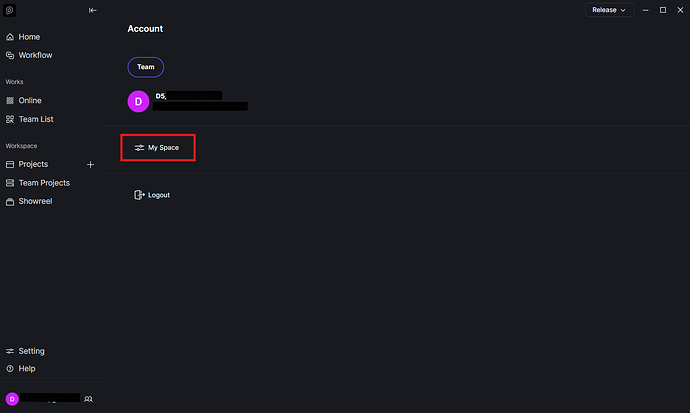
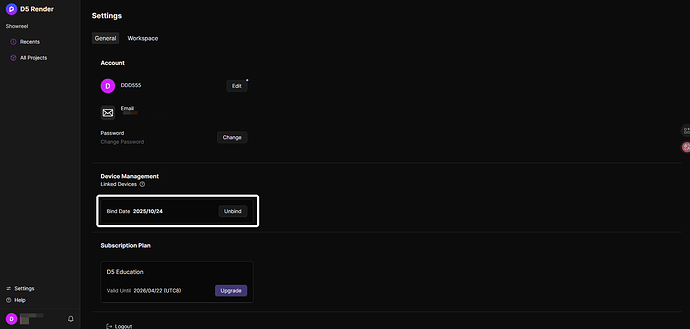
When you use the “Unbind” function, your account automatically reverts to the D5 Community Version. To restore your student license on your device, please reapply using your EDU email. Once your application is submitted, it should be approved again, and the license will be activated on your device.
Please also note that device unbinding is limited to once per year, so kindly proceed with caution before confirming the unbind.
답변 감사합니다.
혹시 질문 하나만 하겠습니다.
혹시 언바인딩 기능을 사용하여 기존 노트북에서 교육용을 해제 한후
바로 새 노트북으로 교육용으로 로그인이 가능할까요?
Hi @202303048
After you have done the unbinding, your educational license will be reverted to the Community Version and restoring it would mean applying for the educational license again.