how to export an animation with pathtracing on? or is this not the way to go with animations?
Hi @irender
In recent D5 Render versions (2.11 and later), Real-Time Path Tracing (RTPT) is enabled by default for all scenes. You can still adjust quality settings — such as GI Precision, Sample per Pixel, and Reflection Depth — under Display → Custom Settings, but basic path tracing is already active.
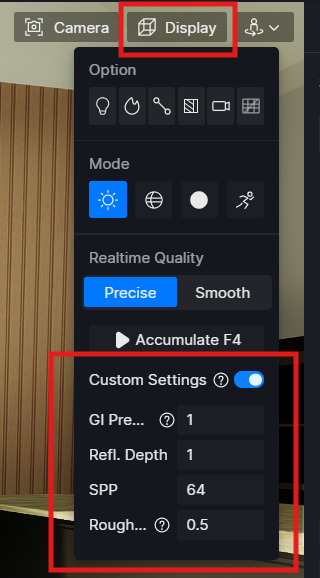
For animation export, the rendering pipeline will use path tracing automatically. You don’t need to turn it on again, though you may want to tweak sample counts for higher-quality output.
If you notice that path tracing doesn’t appear in the final video, a common workaround is to export as an image sequence and compile it in external video software. It’s also a good idea to test with a simple scene first to ensure your settings work as expected.
You can check out our official documentation to learn more about real-time path tracing here: What Is Real-Time Path Tracing in D5 Render & Why It Matters