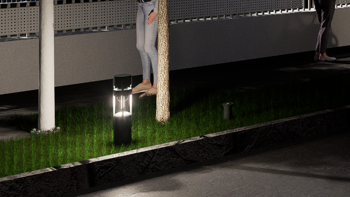
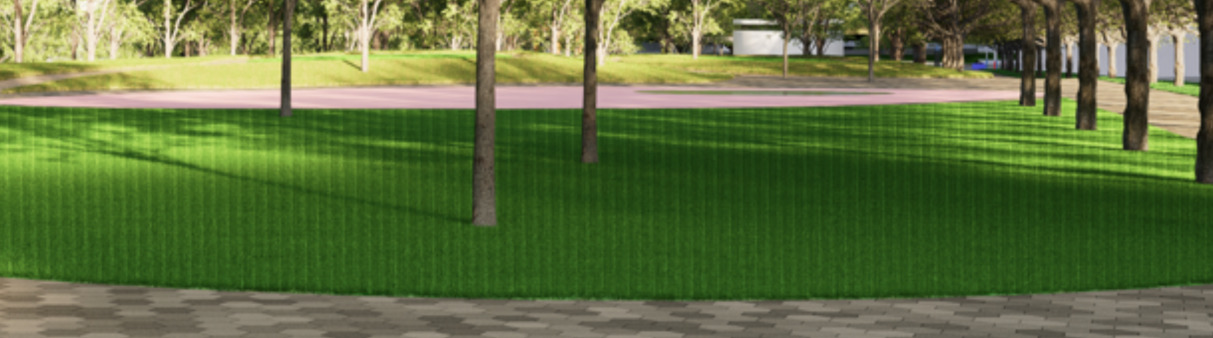
I’m currently encountered an issue with the built-in Material Template: Grass.
Previously, the grass looked normal and realistic in the preview, but after render done, it shows a noticeable stripe/banding pattern across the surface in the result. It happened at both day and night render. I did not intentionally change any major settings, so I’m not sure what caused this. It happens at random times, and sometimes just got fixed without changing anything.
For your information, my D5 version is D5 PRO 2.11.1 and my GPU is NVIDIA GeForce RTX 5060 Ti.
What I’ve tried:
Reapplying the grass material
Adjusting the height, density, etc.
Adjusting which surface has the grass material (so it won’t overlap)
Increase the resolution
Updating the model from SketchUp
Are there recommended settings to avoid this stripe effect in the future?
I’ve attached screenshots below for reference.
Any help or suggestions would be greatly appreciated. Thank you!
This issue was first reported in version 2.11, and we were unable to replicate it at that time. As a result, we decided to collect the user’s files for further troubleshooting.
The previous workaround that was shared by a user was to disable Super Resolution, which was effective.
With the release of version 3.0, some adjustments were made that may have resolved this issue. If the problem persists in version 3.0.1, please don’t hesitate to send us your D5 file and log files for further investigation.