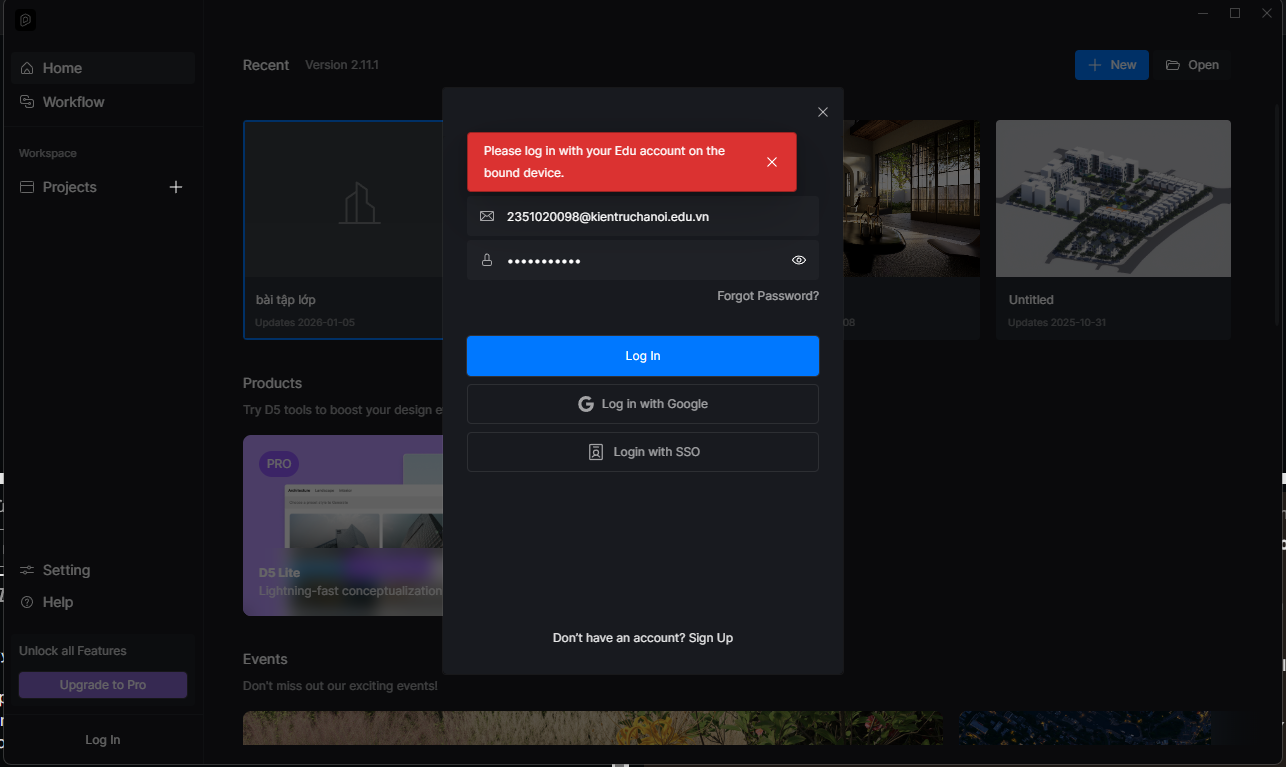
I am writing to request assistance with a login issue I am experiencing with D5.
I am able to log in successfully on the D5 official website using my account without any problems. However, when I try to log in through the D5 Launcher using the same account credentials, the login consistently fails.
Since the website login works correctly, I am unsure why the launcher login does not function, and I have not been able to identify the cause on my own. I have already checked my ID and password multiple times and confirmed that they are correct.
Could you please advise on what might be causing this issue, or let me know if there are any additional settings, network requirements, or known problems related to the D5 Launcher login?
Thank you very much for your time and support. I look forward to your guidance.
Have you switched devices or operating systems recently?
Is this the original device you used when applying for your EDU license?
Have there been any recent changes to your device, such as reformatting the system, upgrading or replacing the SSD, or other major hardware or system updates?
These changes can sometimes affect device verification when using EDU license, even if website login works normally. Thanks in advance
Thank you for your support. I would like to clarify my situation regarding the device verification:
To answer your questions:
Did I switch devices?** Yes, because my main laptop was broken and had to be sent for repair.
Is this the original device?** No, I had to use a different device to create my account and apply for the EDU license while my laptop was being fixed.
Hardware changes:** My original laptop has recently undergone repairs.
Because of these circumstances, there might be a mismatch in device verification. Could you please help me reset or update the license binding to my current device?
Please note that the educational license is a fixed-seat license and is bound to a single device for its entire validity period. For data security reasons, unbinding the bound device while the EDU license is still active is not supported. Education Version FAQs | User Manual
Since you accessed your account on a different device, the system detects a device mismatch. Which is why you see the prompt “Please log in to your Edu account on the bound device.”
Unfortunately, you will need to wait until your current EDU license expires, after which you may reapply for a new educational license and bind it to your intended device. Thank you for your understanding.