I’m having issues with the panoramic renders created in D5 — when I open them on the Meta Quest 3, the scale looks abnormal.
I tried a few settings suggested by ChatGPT, but nothing solved it.
Has anyone else faced a similar problem?
Hi @eoleandroo
I apologize for the inconvenience. Can you provide us with screenshots or, better yet, a video recording of this issue?
Looking forward to your reply, thank you.
It may look normal in the recorded video, but using the glasses, it seems like everything is on a larger scale. I’m sorry, but this is a screenshot from the video I was going to send you.
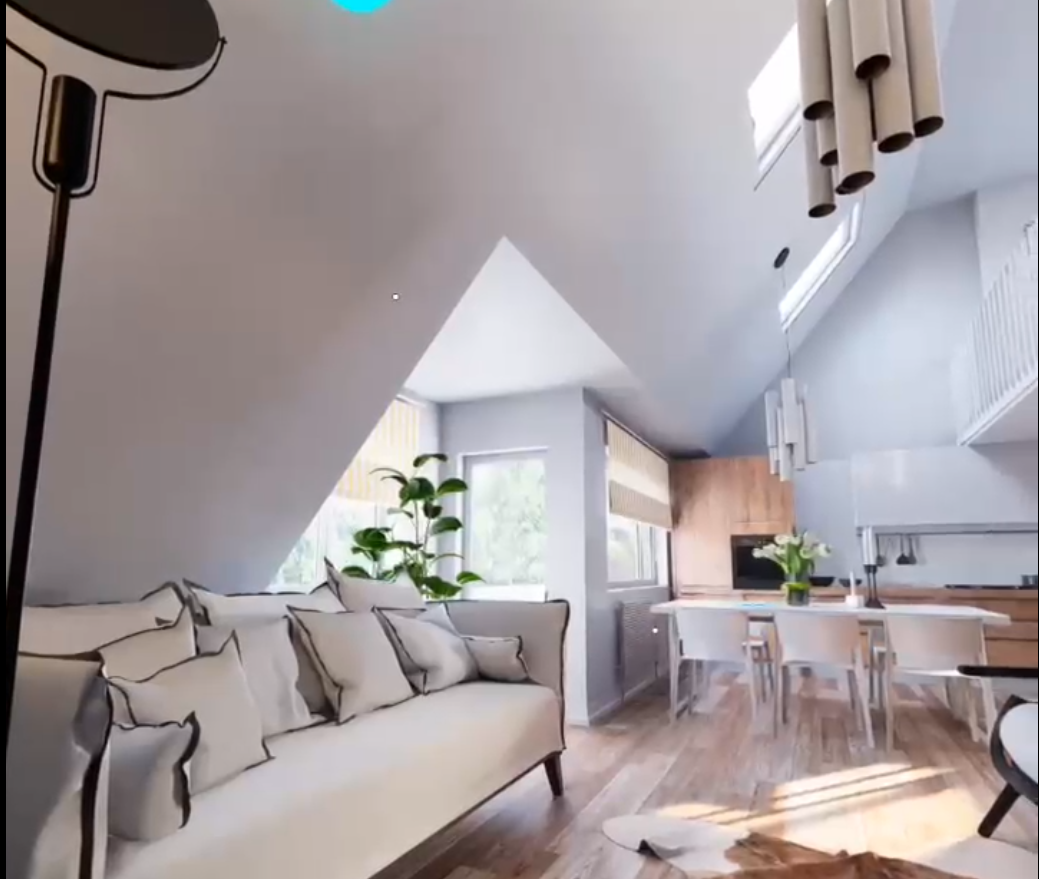
I even considered upgrading my Pro subscription to the other plan so I could present projects to my clients, but unfortunately, this scalability issue hindered me.
Hi @eoleandroo
Thanks for sharing the screenshot. Could you provide a bit more detail about what exactly feels oversized when viewed in the Meta Quest 3? From the image you sent, nothing appears out of the ordinary — normally, the panoramic render displayed in VR should match the scale of the rendered output.
If you can describe what elements look “too large” or how the scale feels incorrect inside the headset, we can help narrow down the cause. Thank you 
Hi,
I posted the same issue a couple of years ago but gave up on trying to solve the issue in D5. We ended up going back to Vray to produce panoramic renders to export into a tour editing software and open on a meta quest, originally 2, and now meta quest 3. I dont know whether the issue is now fixed in the latest issue of D5, but looking at the output options of D5 on panoramic renders, I assume its still not fixed.
What we concluded in house was that the error comes from D5 only exporting a single spherical 360 render. Once you take this render into your panoramic tour software it displays it correct on screen, but once you export it to the Meta quest headset, the viewing scale looks completely wrong. Everythink below eye level looks really low down to the floor and everythink above eye level looks massive high up.
you can try to fake it in D5 by adding another camera slight left / right of the orginaly and render another panoramic, to simulate a left and right eye render. You then can use Photoshop etc to combine the left and right eye image to import into your panoramic tour software. But its still not 100% correct, scale still seems wrong. (we think its the headset doesnt like using spherical panoramic renders.
Why we think this…
We then went back to old school 3dmax / vray and tried several different ways of rendering. In the end we rendered a stereographic (left & right eye) cubic panoramic render in vray ( these are huge in size), Combined both left and right eye correctly in photoshop and then took this into our panoramic tour software and exported to the headset. Not only when we view the panoramic on the headset all the scale was correct and as you would expect but also the left and right eye, added depth to the panoramas, which you dont get from a single spherical render. The quality and realism was amazing.
I asked whether we could add stereographic (left / right eye) cubic panoramic exports to the D5 output, but unfortunately this was never implemented. There we never use D5 for panoramic / headset tours. We always use 3d max / vray. Its annoying as all our renders are done in D5 Render.
I hope this helps.
Thanks.
Hi, how are you?
User keith.hill managed to be more objective and technical in her question (thank you for her clarification). I share the same problem she mentioned. When using MetaQuest, the images appear to be completely out of scale.
As she said, everything seems larger than we imagine. I think it’s worthwhile for the team to try and run a test for a better explanation.
And with the market trend, I think it’s worth trying to solve this problem, as more and more offices are wanting to implement this visualization system for clients.
Thank you for sharing your feedback and clarifying the issue. We completely understand how important correct scale is for VR visualizations.
We’re currently planning to develop stereoscopic panoramic images compatible with VR headsets, but unfortunately, there are no workarounds in the current version of D5 Render.
For more details and relevant cases, you may find this forum thread helpful: Stereographic Cubic Panoramic Rendering.
We appreciate your patience and understanding on this matter. 
1 Like
Is anybody else having issues with connecting their meta quests to their D5 app? Whenever I try and connect my headset using the VR beta widget it just tells me that no headset could be found. The headset itself is connected via the meta quest app and I have tried to connect it both when it was screensharing and when it was not, I am not sure what else I need to do in order to make D5 recognize the headset. Any tips/ideas would be great!