Good day! I keep getting the “Please log in with you Edu account on the bound device” error when signing in to my account. I recently built this new system and this is where i used my D5 edu license renewal last January. I’ve been using it ever since and haven’t changed any component but suddenly i got logged out and it keeps telling me to use the error. Please help me and I have deadlines due. Thank you so much 
Hi @hdromero
What version of D5 are you using? In D5 Render 3.0, you can unbind your device directly from your MySpace page.
Please log in to your Launcher, click on your email, open your My Space page, and unbind the previous device entry. You can then log in again to your current setup.
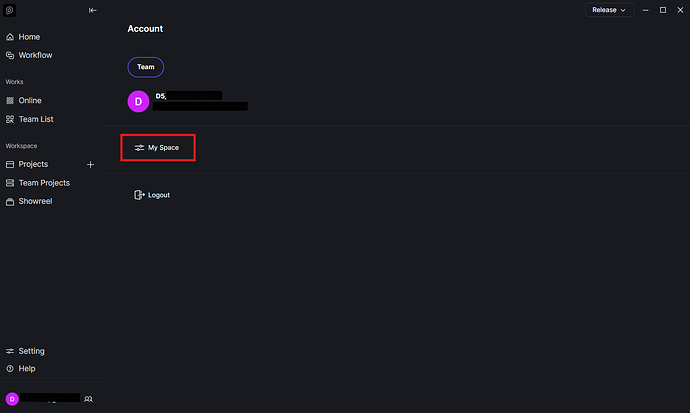
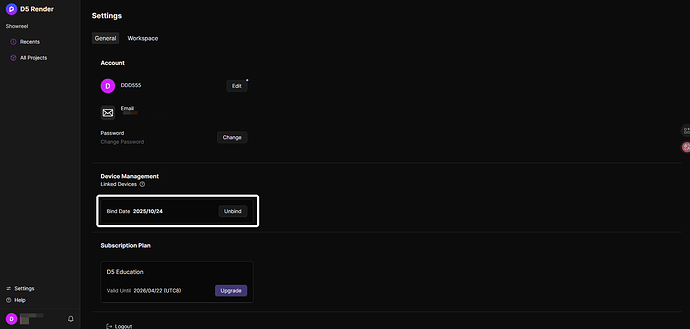
When you use the “Unbind” function, your account automatically reverts to the D5 Community Version. To restore your student license on your PC, please reapply using your EDU email. Once your application is submitted, it should be approved again, and the license will be activated on your device.
Please also note that device unbinding is limited to once per year, so kindly proceed with caution before confirming the unbind.
Hello, same problem here all I did was to download an update for the d5 render and all of sudden my device is no longer recognized. I already unbound my account this year with the same problem. Are there any options for me to fix this? Thank you so much in advance
hello! i solved mine by reinstalling the d5 application on my computer and relogging in after a while
1 Like
I already reinstall d5 and the problem still persist
Hi @2191999
Thank you for reaching out. Updating to the latest version of D5 should not normally cause your device to become unrecognized. Could you please try manually unbinding your device from your account and then logging in again? You can follow the steps from above.
If the issue persists, please let us know, and we’ll be happy to investigate further.
HI, I already unbind my device january this year. And Myspace is not allowing me to unbind again. This usually happens when I update the version of my D5 render
An update to this error: after reinstalling D5 render and launching it right away, it automatically log in to my account, but after closing the program and reopening it, it is already logged out and my device is not recognized again
Hi @2191999
Thank you for the update, and I apologize for the inconvenience caused.
May I ask if you recently changed your device or made any major updates to your system (such as a Windows update, a hardware change, or a system reset)? These kinds of changes can cause the system to no longer recognize the device, which may result in the account being automatically logged out when reopening D5 Render.
Please let me know so we can further check what might be causing the issue.
1 Like
Hello. I’m having a problem. I already registered using the second method because I don’t have an .edu email address. The issue is that I can’t log in. I get a message saying “Please log in with your EDU account on the bound device.”
If I log in from the website, it works, and it also indicates that I have the edu license.
I read that it can be affected if you change the hard drive or some other component, but that wouldn’t be my case. I just installed the launcher yesterday
1 Like