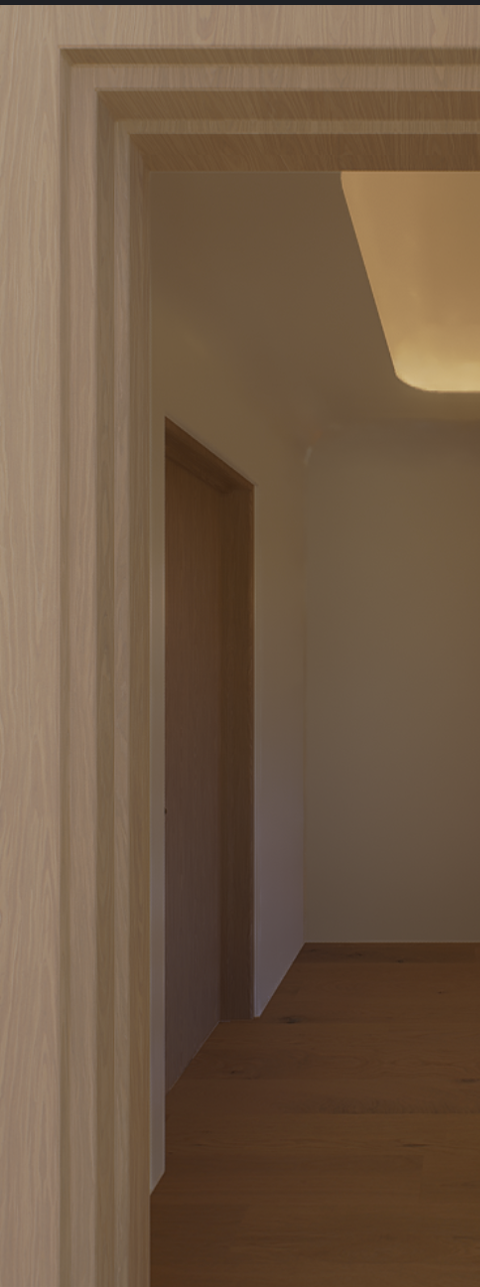
I’ve had this issue for a while, but the colors in D5 are not consistent. As someone who works in Interior Design, color accuracy and consistency is very important, and it.s very frustrating that D5 has poor color consistency, especially in shadows where I noticed the colors change hue and are sometimes oversaturated. In this screenshot, the wood of the door casing in the foreground, is the same wood as the door on the left of the hallway. However, they are different colors. The color of the door on the left has a purple hue to it, and the floor is over saturated. I have no idea why.
Some variation in color between identical materials is expected, as D5 uses physically based global illumination where indirect lighting and color bleeding affect how materials appear under different lighting conditions.
However, if the color shift seems excessive, you can try:
resetting the Color Grading settings,
setting a neutral White Balance,
using Manual Exposure instead of Auto Exposure,
and comparing the results between HDRI and Geo&Sky.
These adjustments can help determine whether the effect is caused by lighting, post-processing, or another rendering setting.
If the issue still persists, then you can send us your D5 File for testing.
Thank you for the reply, sorry that i keep posting complaints or questions. I really like D5, and sometimes I guess I get disappointed when it is not “perfect”. Unfortunately I cannot share the file as it is a confidential project (I work with high end interior designers). The color is still inaccurate, however it was a quick fix in photoshop.