When updated D5 (free version) doesn’t show the toolbar with D5 Lite. What can I do?
Please check the following:
-
Please install the latest version of D5 Lite
-
You may also check SKP’s extension Manager. Enable the extension in SketchUp. Go to the SketchUp menu bar, select “Window” > “Extension Manager.”
-
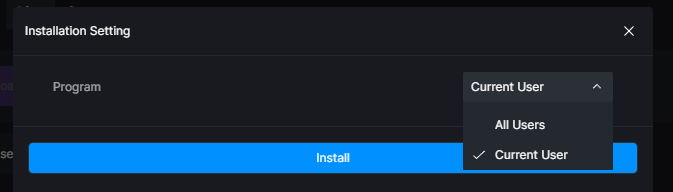
You can try to reinstall and select “For All Users” if Current User was selected before.
If the issue still persists, please provide us with screenshots.