I’d like to understand the D5 file storage and space usage, and how to improve this.
My system and D5 are installed in a 500gb SSD. But I also have a 2TB HDD.
The SSD keeps getting fuller and fuller even if I don’t save anything new there. My projects files are all saved in the HDD.
D5 is obviously taking up more and more space in the SSD, but I’m afraid of losing assets and configuration if I move things around.
Is there an easy configuration change that can make D5 save it’s files on the other storage unit?
I’m not great at thing type of thing so if anyone can help it’s much appreciated.
Hi @brunaghot2
The reason your SSD keeps filling up is that D5 stores workspace assets (materials, models, HDRIs, LUTs, etc.) and some temporary/cache files on the SSD by default, even if your project files are saved on your HDD.
Could you also provide a screenshot of your current workspace path in D5 Launcher? This will help us guide you more precisely in relocating your assets.
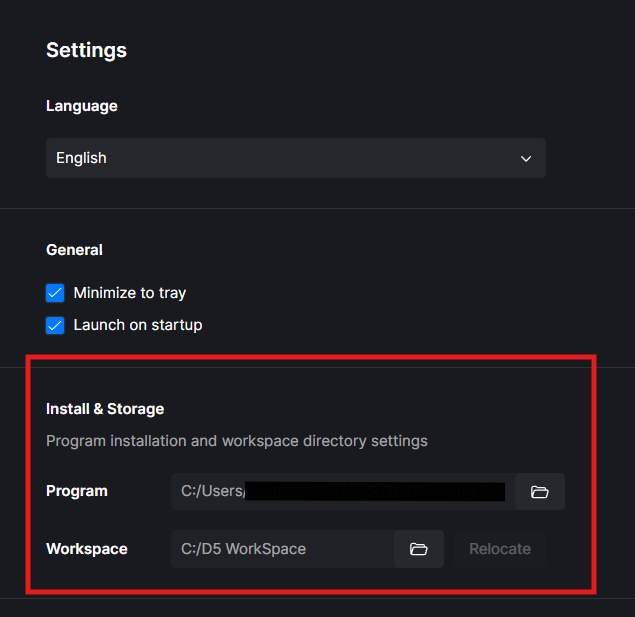
Hi, thanks for the help! I understand the issue now…
Can I sort of “clean up” these files? Without losing project’s content?
And make it so D5 saves future content in the other storage.
Here is the setting:

Hi @brunaghot2
You can safely move the D5 Workspace to your HDD. Doing this will automatically migrate all existing assets and resources to the new location and will not cause any data loss if performed through the launcher.
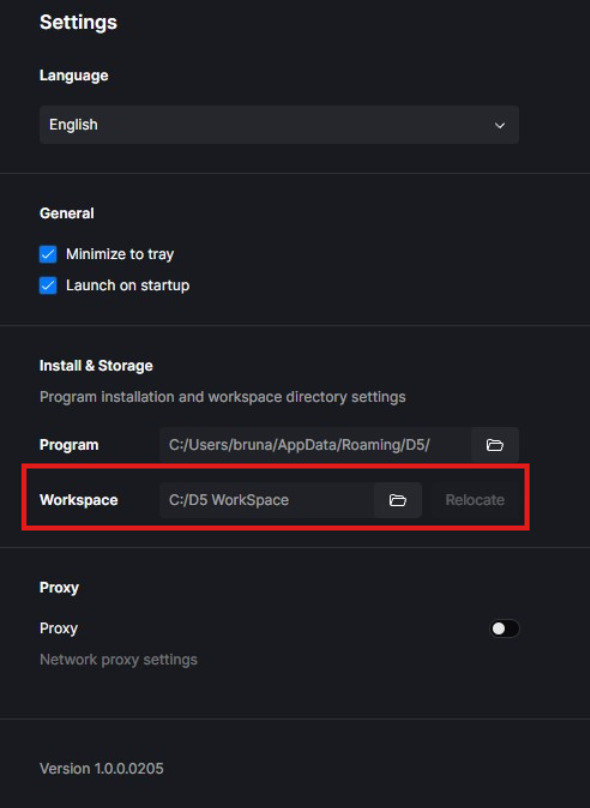
You can also continue saving your project files on the HDD as you are currently doing. This setup is safe—nothing will be deleted; the data will simply be migrated to the new workspace path. Thanks
Perfect! I just did it and freed up almost 30 gb from my ssd.
Great help, thank you so much! 
You’re welcome. Thanks for the update 