Hello! I was working on a file today and it suddenly crashed during a quick action.
When I opened the file again, it showed me the backup files available and I choose the last one. I tried to save in the same folder, but it said it needed to be a new one, and so I did. For my surprise, when I opened the file, most of the objects of the model assests library lost their textures/images. Is there any way to quickly fix this?
I apologize for the inconvenience. I would like to ask for clarification regarding the process you have done.
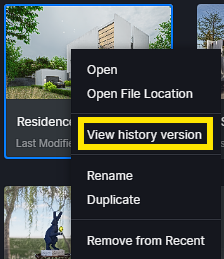
You can usually access backup files via the Project List by right-clicking and selecting “View Version History.” Try to access this part then see if the progress is saved.
When was the last time you saved the file? The backups depend on how frequently the auto-save feature is set.