The solution that worked for me was to uninstall v2.10 and re-install v2.9. Clov posted a link above to it.
Hi there, I am having the same problem here in Jakarta, Indonesia. It seems the AI Enhancer is stuck at the very beginning. Can you help me with this ? Thanks
We’re sorry for the inconvenience you’re experiencing.
There was a Cloudflare outage earlier today that affected several online services, including D5’s AI Enhancer. This caused the tool to freeze or get stuck during initialization. Our team has already confirmed the issue and applied the necessary fixes.
Please refer to our official forum update here for more details: Apology Regarding the Cloudflare Outage on the December 5th - Get Help - D5 RENDER FORUM
If the issue persists after the outage resolution, kindly restart D5 Render and try again.
Hi thank you for the response @ela. Currently working with the AI Enhancer, but there’s another issue that the image is not found in the specific location. Can you help me with this one? Thanks
Hi @enricomelvin95 sure, could you please elaborate on the issue regarding the image not being found in the specific location?
It would help if you could provide a screenshot of the error message (if there’s any), the exact file path you’re trying to access, and whether the image is stored locally, on a network drive, or in cloud storage. Thanks
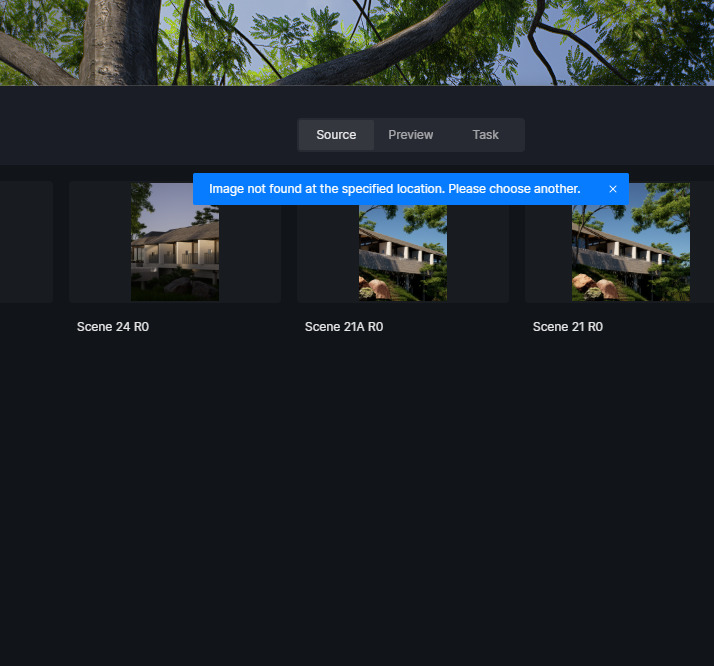

We couldnt find the images either in our folder. However, we can find the name of the file in our rendering history. @ela