having the same issues after the update. pano render that took 10-12 mins are talking 1 hour to render. I have rtx 5080. the update did something. some of my team have the menu glitch issue as well.
![Screenshot 2026-07-13 103853|690x387]
(upload://xAj5J7XKEFn69m8wNvUcVmeE4FN.png)
same issue from the loading screen itself and persists throughout the ui
Hi @thearchidyll_1 @amirul1 @tochipheng @thaslimsherif
Can you all confirm that you’re all using 2 or more High Definition Monitors? And please try use only 1 just to see if the issue persists.
It would also be best to send us your log files. Please refer to the reply I have made above. Thank you for your cooperation and we’re very sorry for the inconvenience. 
1 Like
i can send you the log file but the project am working is confidential and cannot be shared. does that works? and. yes tried with both 2 screen and 1 screen… problem is same… upon putting the smooth mode the flickering disappears. but ui still flickers occationally
hey, same problem after the new version, some files dont even open, goes up to 99% and the computer freezes and I need to restart everything, I have a deadline that I will not be able to deliver because of this, there´s some way to downgrade to 3.0?
Hi everyone,
We would like to inform you that we are intending to release a new build today (given that there will be no delays) to address this issue. We appreciate your understanding and patience as we work to enhance the stability of this version. 
3 Likes
Hi D5 Team,
Since updating to D5 Render 3.1, the viewport has been constantly flickering, and the screen occasionally shows brief visual glitches or corruption. This issue occurs repeatedly during use and significantly affects the workflow.
It seems that this is not an isolated case and may be a widespread issue affecting multiple users.
Thank you for looking into this.
hello @Clov thanks for the reply, yes using 2 monitors, and using just 1 didn’t solve the issue, also, encountered 2 new issues today. depth of field focal point cannot be placed, video rendering is taking the time but gives no image sequence, the folder is completely empty, it only happened in some scenes… will try to share the log today.
Hello, I have the exactly same problem. AI features are useless now. Need help/fix ASAP. Thank you
Hi everyone,
I’ve sent to you all the new version which fixed the issue. Please try it and let me know if issue persists.
- We will be releasing this as soon as possible but for now, if users are experiencing this, please let me know privately or perhaps you can reply to this forum thread
im using a legion 5i pro laptop with 3060 6gb gpu & 16gb ram
The issue still persist, I’m using my laptop’s monitor. Same with an external monitor. I even tried lowering its resolution
Hi, same issues here: glitching and freezing after updating to the newest D5.
I’m using Legion Pro 7, Processor: Intel(R) Core™ Ultra 9 275HX, RAM 64GB, 2TB storage.
Also want to share the video rendering outputs are also heavily glitching in the glass(reflection) and sky
AI Post Processing UI flickers when processing images at 2K resolution or higher (D5 Render 3.1)
Hello D5 Team,
I would like to report an issue that I have been able to reproduce consistently in D5 Render 3.1.
System Information
- D5 Render 3.1
- Windows 11 25H2
- NVIDIA GeForce RTX 3060
- NVIDIA Studio Driver (latest version)
- Microsoft Edge working normally
- Microsoft Edge WebView2 Runtime installed
- Multiple monitors (issue also reproduced with a single monitor)
Issue Description
The AI Post Processing interface starts flickering continuously when processing images rendered at approximately 2K resolution or higher.
The issue affects the entire AI Post Processing interface, including:
- AI Enhance
- Style Transfer
The interface repeatedly appears and disappears, making it very difficult—or sometimes impossible—to interact with the available options.
The renderer itself continues to work normally. The issue only affects the AI Post Processing interface.
Troubleshooting Performed
To isolate the cause, I performed the following tests:
- Clean reinstallation of D5 Render
- Removed all personal settings during reinstallation
- Updated to the latest NVIDIA Studio Driver
- Tested with a single monitor
- Tested with multiple monitors
- Tested multiple different D5 projects
- Tested a brand-new scene
- Repaired Microsoft Edge
- Restarted Windows
None of these steps resolved the issue.
Reproducible Behavior
After extensive testing, I found a consistent pattern.
| Render Resolution | AI Post Processing |
|---|---|
| Approximately 1536 × 1920 |
 Works normally Works normally |
| Approximately 2K resolution and above |
 Interface flickers continuously Interface flickers continuously |
| 3840 × 2160 (4K) |
Interface flickers continuously |
I reproduced this behavior across multiple projects, including a brand-new scene.
This indicates that the issue does not appear to be related to a specific project or asset library.
Additional Observations
During my investigation, I found reports from other users describing similar UI flickering issues after updating to D5 Render 3.1.
Some users reported that lighter scenes work normally while heavier scenes trigger the problem.
My testing points to a similar pattern, but the most consistent trigger I found is processing rendered images at approximately 2K resolution or higher, regardless of the project being used.
Files Available
I can provide:
- A screen recording demonstrating the issue.
- The affected D5 project file, if needed for debugging.
Thank you for your time. I hope this information helps reproduce and resolve the issue.
Hi @Kenken
So the UI still glitches even after installing the new build that I have sent you privately? Can you send us some screenshots? Please show the D5 Render Version.
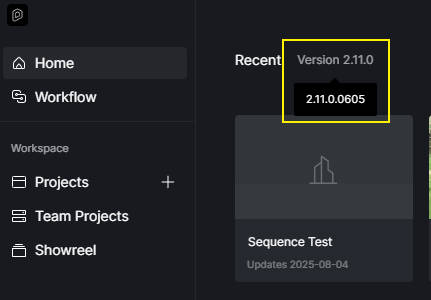
Hi @yiwendai0106 @paulof.santos89
I’ve sent you the new builds privately. Please try to download them and install them. Let me know if the issue persists.
- If it still persists, please send us your logs


I have not yet tried to install the build you’ve sent me but i made a discovery that it seems the issue only affects projects that were created before the update.
Hi, Clov. I tested the version you sent me, and it worked for me. Apparently, the issue has been resolved.
1 Like