Managing a complex scene in D5 Render can be a dream until you hit the “Google Earth” or “Large Site” wall. Having to click through hundreds of individual mesh tiles just to tweak a single roughness value isn’t just tedious; it’s a workflow killer.
Feature Request: Bulk Material Editing & Dedicated Material Manager
The Problem: Micro-Management of Large-Scale Models Currently, D5 Render relies heavily on a “select in viewport” workflow. While intuitive for small scenes, it becomes highly inefficient when dealing with:
Imported Photogrammetry/Google Earth Data: These models often arrive as hundreds of individual tiles, each assigned a unique material name despite needing identical parameter adjustments.
Complex BIM Imports: Large architectural projects can have hundreds of glass or metal variants that require global updates to specularity, reflection, or mapping.
Manually selecting and editing these one by one is prone to error and consumes hours of production time.
The Proposed Solution: Unified Material Editor Window
We need a dedicated, non-modal Material Manager Window (similar to the classic surface editor in Lightwave 3D):
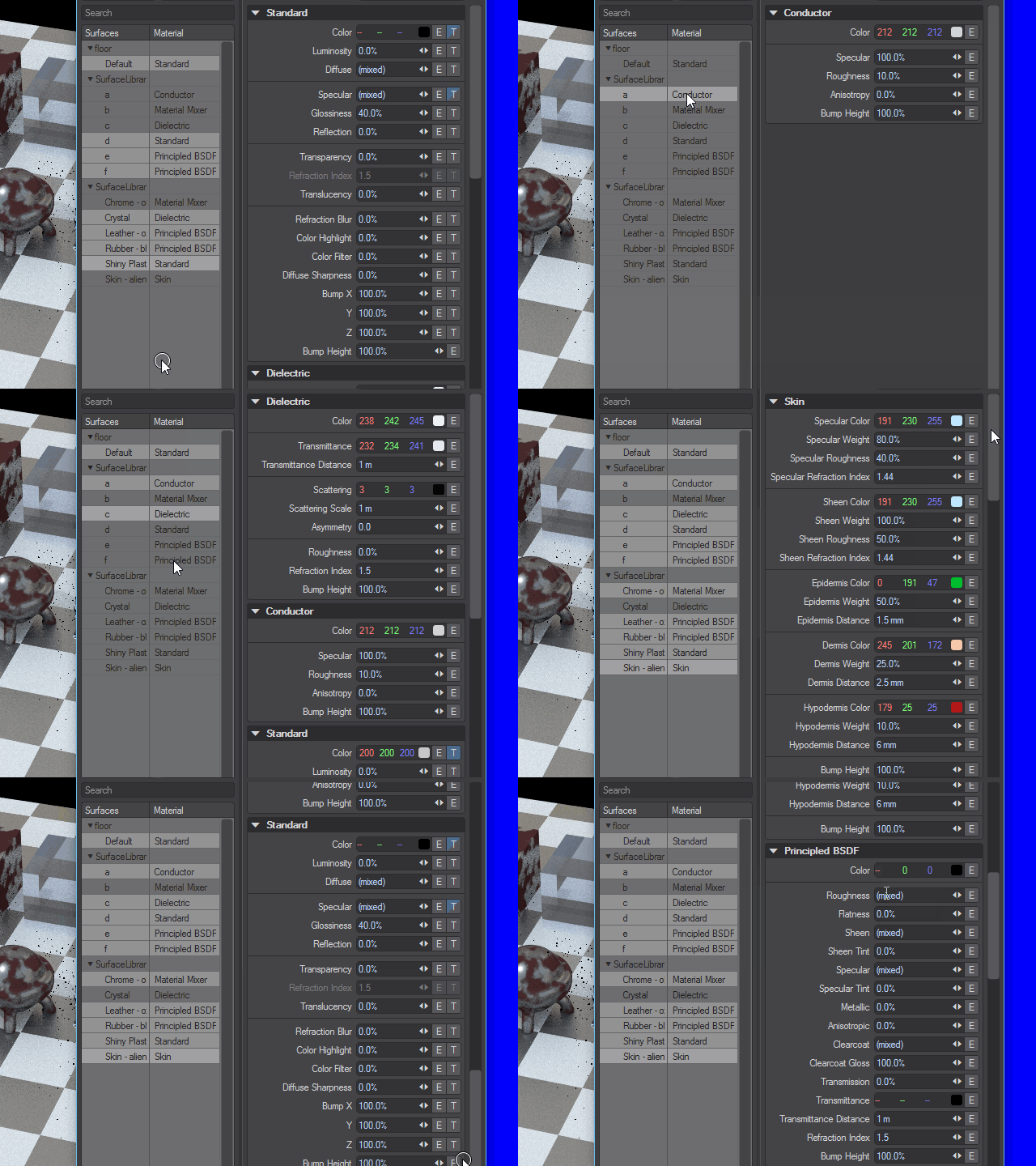
Key Features:
* List View: A vertical list of every material currently in the project.
- Multi-Select Support: The ability to Ctrl+Click or Shift+Click multiple materials in the list.
- Batch Parameter Overrides: When multiple materials are selected, the inspector panel on the right should display shared parameters (Roughness, Specularity, Metallic, etc.). Changing a value here should apply it to all selected materials instantly.
- Search & Filter: A search bar to quickly find materials by name (e.g., searching “Tile_0” to grab all photogrammetry chunks).
Workflow Example: The “Google Earth” Scenario
- User imports 200 tiles of a city model.
- User opens the Material Manager.
- User searches “Tile,” selects all 200 materials.
- User adjusts the Roughness slider to 0.8 and Specularity to 0.2.
Result: All 200 materials update simultaneously, a task that previously took 30 minutes now takes 30 seconds.
Why This Benefits D5 Render
- Scalability: Positions D5 as a more viable tool for massive urban planning and master-planning projects.
- User Retention: Reduces “friction” and frustration for power users and professionals coming from traditional DCC (Digital Content Creation) software.
- Organization: Provides a bird’s-eye view of project assets without needing to hunt for them in the 3D viewport.