As an Architect we need the sun to be in the correct position relative to the real world for sun studies/designing for natural light/client images etc.
Currently the sun location options in D5 are arbitrary (unless I’m missing something).
See Twinmotion or Archicad for examples of real world sun setups, they have options to input the following, which then correctly locates the sun for the building project:
Glad to tell you that we have added the feature in version 1.9.0(Time of day, time of year, location and North offset)
Now the version is in preview tests and will be released soon.
Please wait for updates.
Hi,
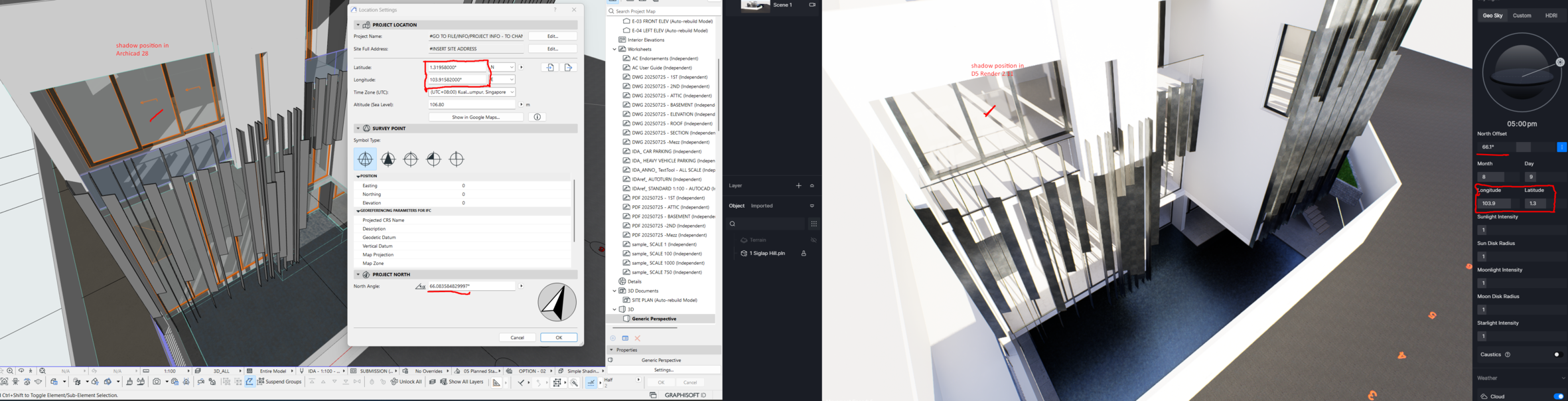
Just want to raise this issue that I notice using D5 render regarding sun location. I have attached a screenshot that I encountered with the software (Archicad 28) that I am using and D5 render 2.11 using live sync. Location of the sun doesn’t match and even if I manually key in the values it stills show differently.
Looking forward to your reply.
Old post, but just in case someone is looking for an answer, D5 doesn’t recognize True North number when linking/importing. The only orientation is Project North. And even that can be 180deg off. Adjust D5 North Offset accordingly. In my project I needed 180 - True North Archicad value.
I do advice to use Google Earth as a sunrise/sunset locations reference to make sure you don’t have anything wrong.