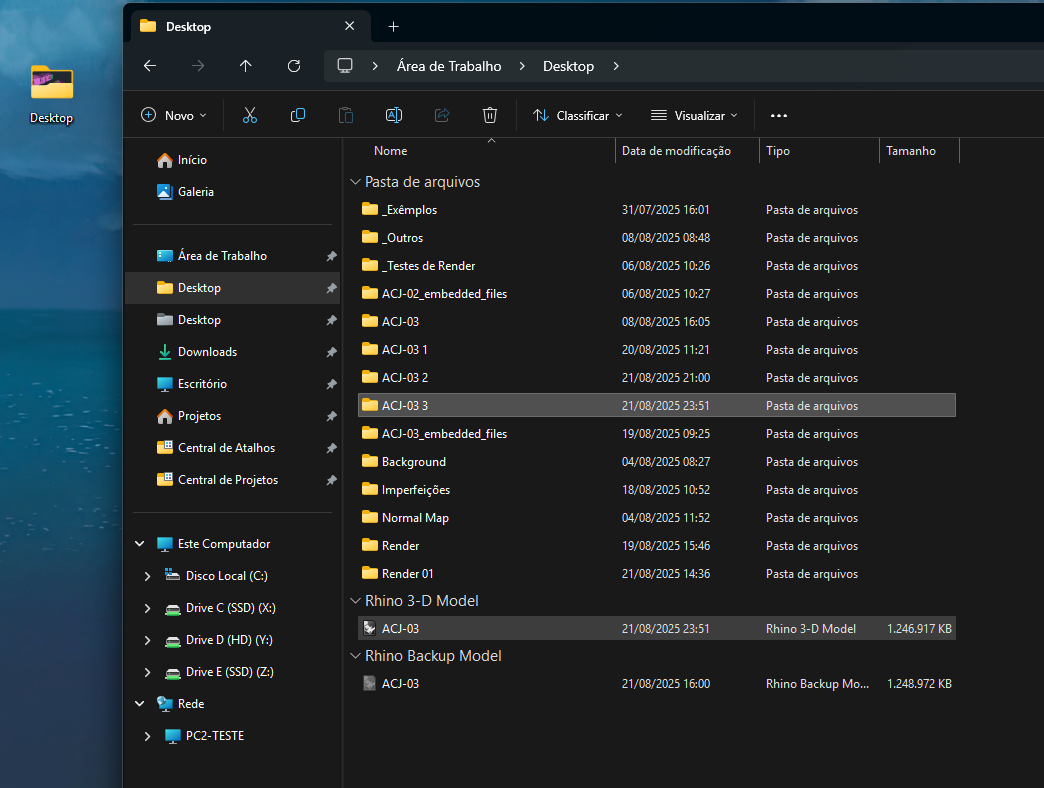
Hello, both files are located on the working computer (C:\Users\Administrator\Desktop\Desktop). I do use a laptop with file sharing to this computer, but I am not using it for this project.
I started modeling the 3D using the server file, but once the file got bigger and took longer to load, I moved it to the SSD of my workstation. Some textures I used were drag and drop directly from the server into D5, so I understand those could potentially be lost. However, even textures I configured directly inside D5 lost their settings.
For example, I applied a matte porcelain tile (I didn’t change the texture itself, only adjusted settings like specular), and when I toggled layers on and off, then closed and reopened the software, the settings were lost.
Considering that both files are on the workstation (meaning they are not being opened over the network), what else can I do to avoid this issue?
For now, I switched my plugin from Live Sync to only Sync. I deleted the Live Sync model and opened the Sync model in the same file to keep the cameras. I haven’t configured materials yet, so I don’t know if this will change anything.
Is there any other information I can provide? What do you suggest I do to successfully finish this render?
I tried replicating this issue by following your description, but the material information seems to remain on my end despite hiding/unhiding the layer, then completely closing then reopening the file.
Can you perhaps record a video of the whole process?
I am currently also facing the same issue. It is getting tedious because every time I hide the ceiling layer on my rhino file to model things. Live sync it to d5, and then after a while turn the ceiling layer back on, the material of the ceilign layer that i have set in d5 have all turn to the rhino default material.
Hi,
I have the same issue too. All the materials in my main synced model are gone. They now appear as the Rhino layer colors. We use D5 Teams in the office. Last night I finished a D5 file, but when one of my coworkers opened it today, all the materials were gone. We work using Live Sync with Rhino 7. The model I finished last night now shows all the materials as the default custom base color.
There is no problem with the materials of the models I imported separately. There is also no issue with the scatters. Only the materials of the model I synced are gone.
Is there any way to restore these materials? My deadline is very close and my project site is really big with a lot of different materials. I saved some of the materials to the team, but not all of them.
Hi, sorry for the late reply. I had to submit the project, so I didn’t have time to troubleshoot and ended up reapplying all the materials manually.
However, I am now redoing the project and the issue has happened again. I updated the Rhino model (I duplicated the original file to keep a backup), and then synced the new Rhino file. The file has the same name, layers, and materials, but all the D5 materials are gone again after syncing.
This is becoming a recurring issue, so I would really like to find a proper solution.
To answer your questions:
I am using Rhino 7 and the latest version of the D5 LiveSync plugin
I’m not completely sure whether the file was saved locally or via D5 Teams, but I followed D5’s official YouTube tutorial to set up the Teams workflow
The missing materials are D5 materials (not Rhino materials)
When I open the Material Library, the materials are still there, but they are no longer assigned to the model
I would like to avoid reapplying all materials manually every time I update the model
Please let me know what might be causing this or how I can prevent it from happening again.
Could you please inform me where these files are currently located? We generally do not recommend placing them in your Cloud or Network Path, as this may lead to issues such as:
Materials reverting to their previous appearance
Models being misplaced or potentially disappearing
To ensure a smooth workflow, please store these files on your Local Drive (either the C or D drive) while you are working on them. Once you’re done, you may zip and store these files in your cloud storage or on a network path for transfer only. Additionally, we highly recommend providing a video recording of the process by which the issue is reproduced on your end.
Just some additional questions,
Were there any modifications made to your material layers?
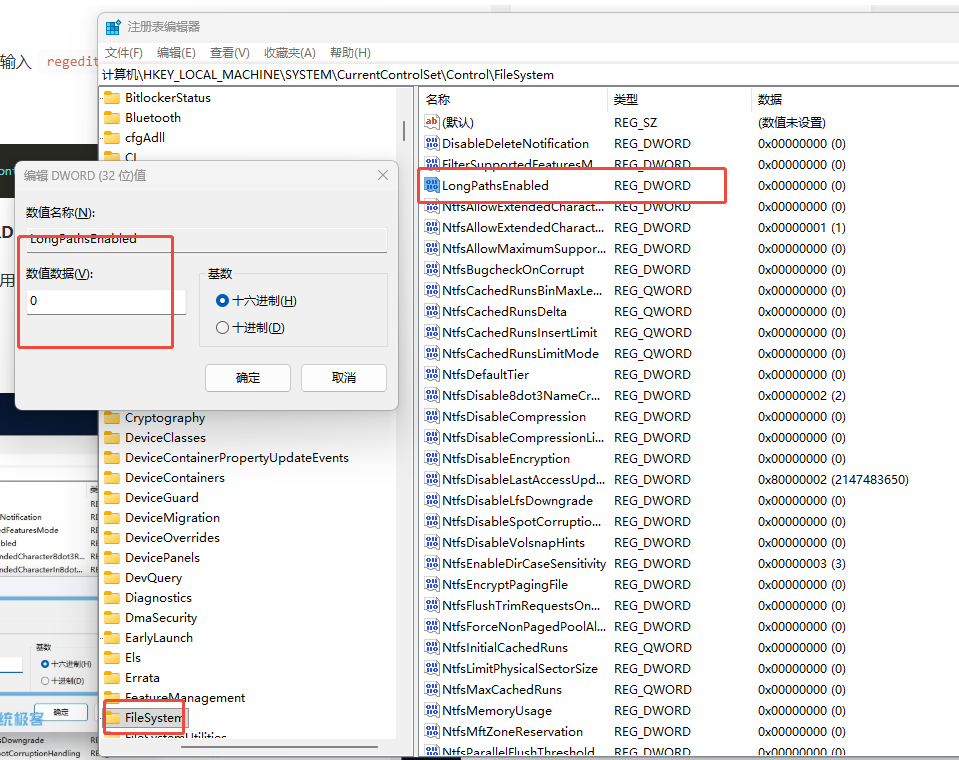
Please try to enable LongPath in your registry.
You may do the following steps (Enable Longpath):
Press Windows Key + R, type regedit, and hit Enter
Navigate to: HKEY_LOCAL_MACHINE\SYSTEM\CurrentControlSet\Control\FileSystem
Find the entry LongPathsEnabled.
If it doesn’t exist, right-click, select New > DWORD (32-bit) Value, and name it LongPathsEnabled.
Double-click LongPathsEnabled and change the value data to 1