Hello,
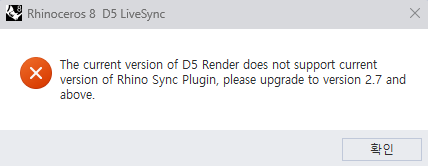
I am experiencing a persistent version mismatch error with the Rhino LiveSync plugin and urgently need help as I am working on my graduation project.
Every time I try to launch LiveSync from Rhino, I get the following error message:
“The current version of D5 Render does not support current version of Rhino Sync Plugin, please upgrade to version 2.7 and above.”
However, I am already using the latest versions of both software. Here are my specs:
- Rhino Version: Rhino 8 (Commercial)
- D5 Render Version: 3.0.1.0683 (Launcher Version: 1.1.0.0545)
- Rhino LiveSync Plugin Version: 1.1.3
I have literally tried every single troubleshooting method found on the forums, but nothing works:
- Changed Execution Order: Launched D5 Render first, then opened Rhino.
- Reinstalled Plugin Scope: Reinstalled the plugin using the “Only for me” option instead of “For everyone”.
- Verified config.ini: Checked the config.ini file, and it correctly states “InstallerVersion=3.0.1.0683”.
- Changed Rhino Runtime: Changed Rhino 8’s .NET runtime from .NETCore to .NETFramework using the ‘SetDotNetRuntime’ command and restarted.
- Clean Manual Install: Completely uninstalled the plugin, downloaded the standalone .exe installer from the official D5 website, and ran it as Administrator.
- Administrator Privileges: Ran both Rhino 8 and D5 Render as Administrator.
- Bypassed Non-English Path & Fixed GUID Conflict: Since my Windows username is in Korean, I suspected a directory path encoding issue. I manually moved the plugin files from AppData to a strict English path (C:\D5_Plugin). I also cleared the old GUID entry (e0d5e210-02f6-4ee9-a2b0-1675e225d958) from the Windows Registry to prevent the “ID is already in use” error. The plugin now loads cleanly from the new path, but STILL throws the exact same “upgrade to version 2.7 and above” error.
Since I cannot use the LiveSync feature at all, could the development team please look into this bug? Any temporary hotfix or advice would be greatly appreciated.
Thank you.
