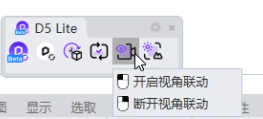
I’m using D5 Lite Live Sync with Rhino 8. Currently, whenever I switch the active viewport in Rhino (e.g. from Perspective to Top or Front to edit geometry precisely), the D5 window’s camera immediately jumps to match that same orthographic view.
This makes it hard to work efficiently — I frequently need to switch to Top/Front/Right in Rhino just to snap or edit geometry accurately, but I don’t want the D5 preview to follow along into an orthographic/flat view each time. I’d like the D5 camera to stay locked to whatever was last shown from the Perspective viewport, and simply ignore view changes coming from Top/Front/Right viewports in Rhino.
Is there a setting (in D5 itself, or in the Rhino-side sync plugin) to lock/restrict live sync to a specific viewport (Perspective only), instead of always following the currently active Rhino viewport? I couldn’t find anything like this in either D5’s settings or the Rhino plugin panel.
If this isn’t currently possible, could this be considered as a feature request? It would make live sync much more usable for anyone doing precision modeling work alongside real-time preview.
Rhino version: 8 Commercial
D5 plugin: D5 Lite (Live Sync)