Hi, in 3D Studio Max I have three objects, each for a single layer. I’m trying everything, but in D5 I always see only one layer. That is, I don’t have individual objects, but a group… where am I going wrong? Thanks.
I’ve done every type of one-layer or two-layer export from 3D Studio Max.
From export. I was following a video where they used Rhino and I’m not mistaken and everything worked fine with the same Rhino layers even on D5. Nothing, I understood that 3DS Max does not support this thing. I imported the scene several times so as to have 3 or 4 blocks/layers.
I ran into this too! Currently, D5 tends to group everything by material rather than by your original layers. The best workaround I’ve found is to make sure every ‘layer’ has a unique material name in your modeling software before you sync. Once it’s in D5, you can then select by material to hide or edit things easily.
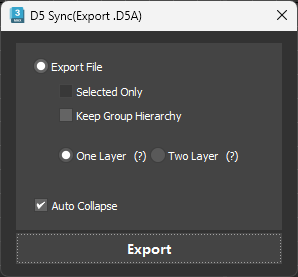
 Exporting manually d5a is very time consuming.