Brought a model into d5 that had xrefs. None of the xrefs appear. Is there a secret to getting d5 to recognize the xrefs? Or do i have to merge them into the max model before sync with d5?
Hi @meah2016
Did you import it directly? Or have you converted the model to an FBX model?
- Please try using the livesync and check if the xrefs are showing,
I use live sync. The xrefs do not show. Some of my files have 20 to 30 xrefs.
thanks.
I did some experimenting. I created 2 cubes, live synched that file. Created 2 spheres in another file and saved that as my exref file then xrefed it into the cube file. The live sync picked it up immediately. The D5 render showed the xref. Next, I started over with a 3ds max file that has 6 xrefs. Live synched that and no xrefs showed. I removed one of the xrefs then added it. Still no show. I paused the livesync and then restarted it and VOILA! my xref showed up in D5 render. So, the lesson for me is that i need to remove and then reinsert the xrefs, one by one, and keep refreshing. D5 Render Problem solved.
Also, on another subject, i discovered how to work around the fact that D5 does not translate maps with opacity from 3ds max. After i’ve live synched the model with the opacity map into D5, i apply an opacity material from the assets selection (located at the bottom of the assets list) to the object from 3ds max and then, still in D5, in the material readout, I track down the base map and opacity map used in the original max file. BUT…i have to rotate the material UV in its settings either by 90 degrees or 270 degrees. I tested it on some hair and the results were stunning. But i tested it on some other very complicated hair generated by CC5 and the results were not as realistic. Simpler works better in D5.
FWIW
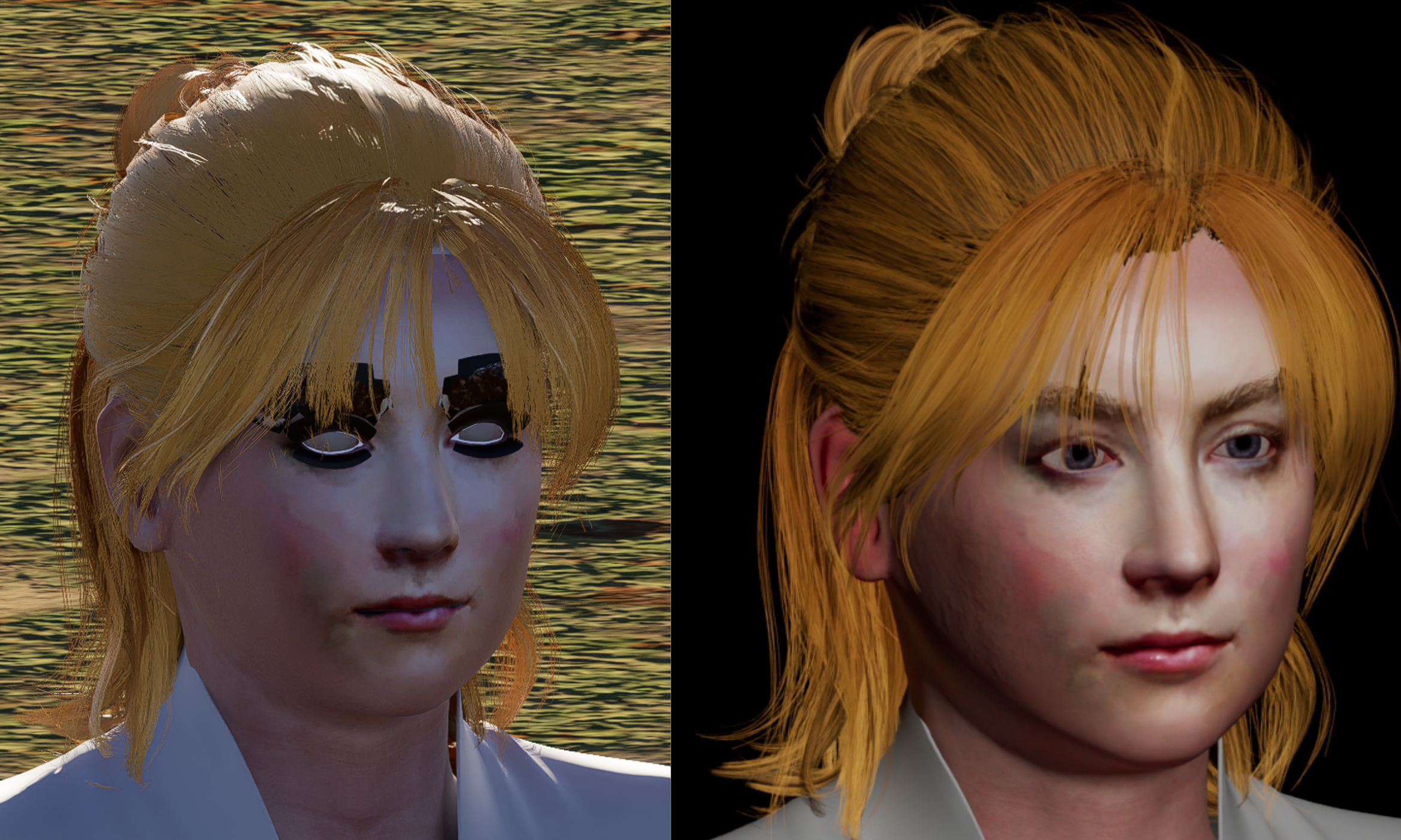
I realize D5 Render is aimed at the AEC world but here are the results of 2 renderings with opacity in the hair. The one on the right is straight out of Max. The one on the left is live synched to D5 Render. I added the “Basic custom alpha material” from the assets in D5 to the hair to get it to include an alpha map. The black portions of the face in D5 also require adding the alpha material in D5 but it has not been added.
Hi @meah2016
If possible, can you send us a sample 3ds Max file with xrefs that are not directly visible?
The files are too big to email. I would have to use an ftp site or such. Do you have access to one?
And the missing xref saga continues. I started a new project that had 3 xrefs. I ivesynch to D5 and see no xrefs. I unload and reload in max to get D5 to see them. All is well. I make a few adjustments to the D5 file and save it to a specific folder and shut everything down. I come back to the original Max file, open it and the livesynch it. D5 shows no exrefs. Where did they go? I go back to D5 and go to “file”, “open”. In the location where i saved the D5 file i see 2 folders with d5 in their name. Inside each folder is a “dr-s” file. They are sequential. I open the first one and it launches an early version of the D5 file. I open the second one and it shows the latest version of the D5 file with xrefs. So, now i know where my xrefs went but the later version is not livesynched to my current Max file. If i live synch my current Max file, i am starting over with D5. If i want to continue with the D5 file as my final work then i stay in the latest version and work from there. Not what i was expecting. I had hoped the D5 live synch would act as an xref of sort and stay linked with the Max file permanently but that is not the case.
Hi @meah2016
You may generate a shareable link using Google Drive or WeTransfer.
Just to clarify, are all the files, including the 3D model, D5 file, and XREF files, located in the same file path? Preferably, store them locally on your C: or D: drive. We don’t recommend placing them in cloud storage, shared network paths, or even on an external hard drive, as these can cause file access or syncing issues.
Since XREF support is still something we are working to improve, what I can do for now is forward this case to our team for further investigation and consideration for future development.
I have 2 1-terrabyte ssd cards and an external 8-terrabyte storage. My ssd cards are as full as i feel comfortable with. Everything new goes to the external storage…but i still pull stuff from both ssd cards. To answer your question about the current project i’m working on, all 3d model, D5, and xrefs are in the same main folder with the D5 files in their own folder that was generated automatically by D5. Some xrefs are in a sub-folder within the main folder, others are just in the main folder with the main 3d max file.
About Google Drive or WeTransfer, i don’t use either one of them.